
Why I Started Using Voice in My Learning Projects
I did not start using voice because every learning activity needs narration. I started because I kept finding situations where text alone was not the most useful way to deliver content, feedback or practice.
On my website, that meant giving readers a way to listen to long articles instead of having to read everything on screen. In learning applications, it meant making feedback available in both written and spoken form. In interview-practice and simulation projects, it meant allowing people to rehearse the way they would perform in the real situation: listening to a question, answering aloud and receiving a response.
ElevenLabs has become the main voice platform in these projects. I use it alongside Lovable, WordPress, browser speech recognition, language models and databases. That distinction matters. ElevenLabs provides the generated voice and related voice services, but it is not the whole application.
Voice can make an experience more flexible and natural to use. It does not automatically make it accessible or instructionally effective. The value depends on why it is being used, what alternatives remain available and how carefully the complete workflow is tested.
What Does ElevenLabs Offer for Learning Design?
ElevenLabs offers a growing range of features. The parts most relevant to learning designers are:
- Text-to-speech: converts text into generated narration. I use this for article audio, spoken instructions, questions, model answers and feedback.
- Speech-to-text: transcribes recorded or live speech. This can support dictation, practice activities and analysis of spoken responses, although transcription accuracy must be tested with the intended learners.
- Voice cloning: creates a synthetic version of an authorised person’s voice. This can maintain a consistent voice across a body of content, but it requires clear consent, disclosure and limits on reuse.
- Conversational voice agents (ElevenAgents): combine speech recognition, a conversational system and generated voice to support spoken interaction. Potential learning uses include interview rehearsal, language practice, role-play and guided performance support.
- Multilingual narration and dubbing: can help create versions of content in additional languages, but translated scripts and pronunciation still need review by people who understand the language and subject.
- APIs, SDKs and embeddable tools: make it possible to connect voice features to websites and custom applications rather than working only inside the ElevenLabs interface.
The important distinction is between narration, transcription and conversation. A course that needs an audio version of a lesson does not need a real-time agent. A pronunciation activity needs reliable speech recognition. A simulation needs orchestration, criteria, feedback logic and data handling as well as a voice.
How I Use ElevenLabs in My Own Projects
I have used AI-powered applications in my projects for several years. Here are a few examples from my recent work:
Audio versions of my WordPress blog posts
I introduced audio because many of my articles are detailed and relatively long. Some visitors may prefer to listen while travelling, walking or completing another low-attention task. Others may find listening easier than reading a long page. The aim is to provide a choice, not to replace the written article.
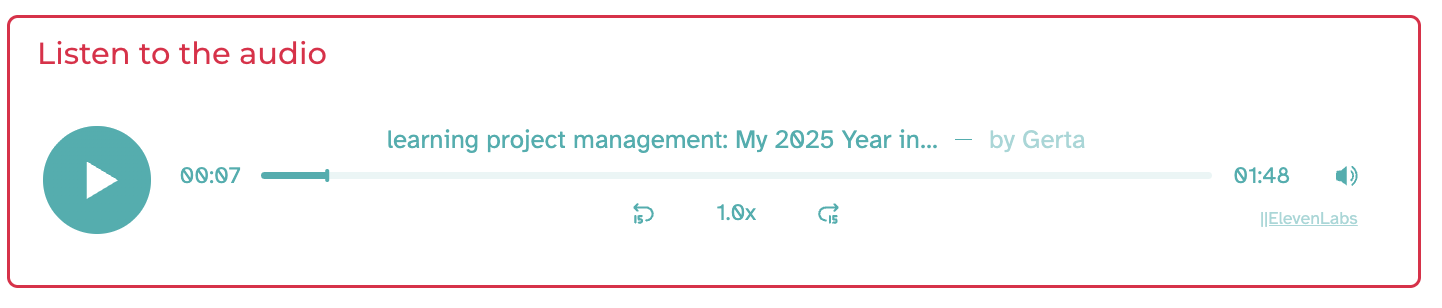
Every blog post on my website can be delivered as audio in my own cloned voice. I use ElevenLabs’ Audio Native player in WordPress, while the full article remains available as structured text. Readers can choose whether to read or listen and can use the player controls to start, pause and move through the recording. ElevenLabs also provides a separate WordPress guide for embedding a voice-agent widget, which is relevant when a project requires conversation rather than article narration.
I do not treat the audio as a live substitute for the page. Whether an integration detects and regenerates edited content depends on how it has been configured. Using my cloned voice provides continuity between my written and audio content. The audio option supports access, but the written post remains essential. A generated recording without readable text, meaningful headings and usable controls would remove choices rather than add them.
Instant feedback and assessment support
I have also used ElevenLabs with Lovable and other applications to provide feedback in a more flexible format. A typical workflow can include the following stages:
- The learner submits a written answer or records a spoken response.
- If the response is spoken, speech recognition converts it to text. Depending on the project, this may be browser-based recognition rather than ElevenLabs.
- A language model analyses the response against a defined rubric or feedback criteria.
- The application displays the written feedback.
- ElevenLabs converts the approved feedback text into spoken audio.
- The learner chooses whether to read the feedback, listen to it or use both formats.
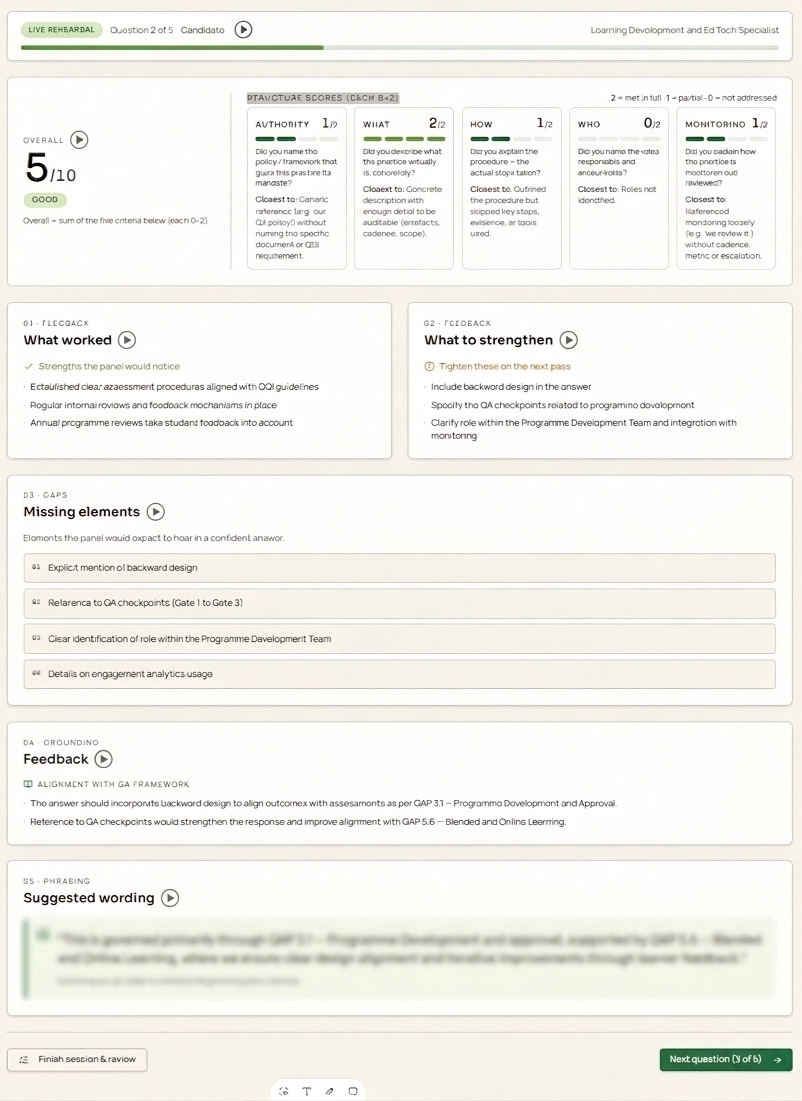
ElevenLabs enters at the voice-generation stage. It does not decide whether an answer is correct and it does not make the assessment judgement. Lovable provides the learner-facing interface and coordinates the workflow. The language model produces the initial analysis, while the rubric, prompts and review process determine what the analysis should address.
For quality assurance, I test the feedback against sample answers, check that it stays within the rubric and review whether strengths, omissions and next steps are represented accurately. If the activity affects formal assessment or progression, learners need access to human clarification or review. Sensitive work should not be submitted to an unapproved system.
The spoken version does not make the feedback more accurate. Its value is in delivery. It can make a long feedback response easier to work through, provide an alternative to dense on-screen text and create a more personal-feeling interaction. The learner should still be able to see, copy and revisit the written version.
Interview practice and simulations
My interview-practice application is the clearest example of voice doing more than narrating content. It recreates part of the experience of responding to a panel rather than presenting another list of interview questions.
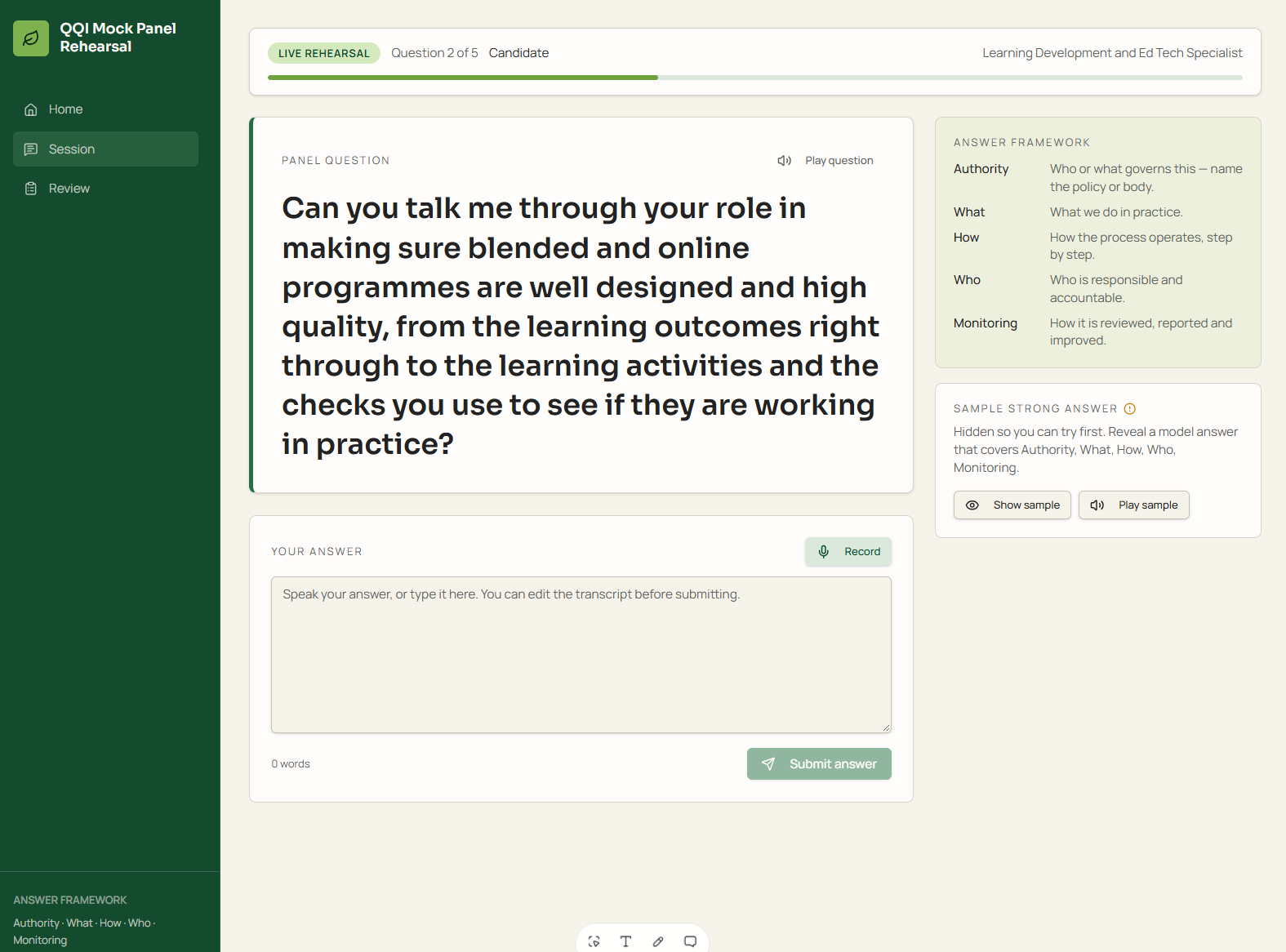
The application can:
- speak panel questions aloud in an Irish English voice;
- allow the learner to answer aloud rather than type;
- transcribe the response in the browser;
- evaluate the answer against defined criteria;
- identify what worked, what was missing and what could be expressed more clearly;
- ask a probing follow-up question;
- reveal an example answer after the learner has attempted the question;
- play that example answer in my cloned voice; and
- save questions, responses and scores to a database for review and export.
Different components do different jobs:
- Lovable provides the interface, application logic and coordination between services.
- ElevenLabs supplies the generated voices used for panel questions and example answers.
- Browser speech recognition captures and transcribes the learner’s spoken answer in the version I built; ElevenLabs is not responsible for that step.
- The language model evaluates the transcript against the criteria, suggests stronger phrasing and generates an appropriate follow-up.
- The database stores attempts, answers and scores so progress can be reviewed and exported.
The app also shows the relevant criteria or policy references so the practice is grounded in the actual interview context. The learner attempts the question before seeing the example answer, which keeps the model response from becoming a script to copy.
This remains a practice tool rather than an automated hiring decision. A transcription error can distort the feedback, and a language model score is not an objective measure of interview ability. I keep text available alongside voice, allow answers and feedback to be reviewed, and would require human review before using a similar workflow for any consequential assessment.
For more context on the Lovable side of these projects, see Lovable for Learning Design: 4 Practical Examples.
Other Learning-Design Use Cases
Beyond the examples above, I have also used voice applications such as ElevenLabs in the following learning-design scenarios:
- Scenario and role-play practice: customer conversations, coaching, difficult workplace discussions or service simulations.
- Language and pronunciation activities: spoken prompts, repeated practice and comparison with a model, provided that automated feedback is not treated as a complete evaluation of fluency or meaning.
- Audio job aids: short spoken instructions for tasks where looking at a screen is inconvenient.
- Performance support: a voice interface that helps someone retrieve a procedure or explanation while working.
- Multilingual delivery: narration or dubbing for additional audiences, with review by a competent speaker.
- Audio assessment instructions: an alternative way to access task requirements, while retaining the written version.
- Reflective practice: learners record a response, review the transcript and identify what they would change.
Each use needs a clear learning purpose. Adding a voice because it sounds impressive usually adds cost and complexity without improving the activity.
Integrating Voice AI with Learning Design
Learning Management Systems
I did not find or use an official, universal ElevenLabs connector for common LMS platforms in the documentation reviewed. That does not prevent integration, but the method depends on the platform. Common options include:
- generating an audio file and uploading it to the LMS;
- embedding an accessible audio player in a lesson page;
- linking to an externally hosted voice-enabled activity;
- using an API when the LMS or connected application allows custom development; or
- embedding a conversational widget in a compatible website or portal.
For a simple narration requirement, an embedded audio player or an uploaded audio file may be more reliable than an API integration. A conversational assessment or simulation is more likely to sit in a separate web application connected to the learning platform.
Before deployment, check authentication, learner-data flows, browser permissions, recording consent, mobile behaviour, keyboard access and what happens when the voice service is unavailable. Institutions may also require procurement, security and data-protection approval. As an independent designer, I can test tools directly in my own projects, but I still need to check the requirements of any client or organisation whose learners and data are involved.
Accessibility and Quality Checks
Voice can add another route through content, but it can also create barriers. My minimum checks are:
☐ provide captions for video and synchronised media;
☐ retain written instructions and feedback;
☐ provide a non-voice route through essential interactions;
☐ use a player with labelled play, pause, volume and navigation controls;
☐ test keyboard and screen-reader access;
☐ do not use audio as the only place where important information appears;
☐ allow learners enough time to review questions and responses; and
☐ test with the accents, devices and environments expected in the real audience.
Quality checks should cover names, acronyms, technical language, numbers, dates, emphasis and tone. For speech recognition, test background noise, microphone quality and a range of accents. A transcript must remain editable or challengeable when it contributes to feedback or assessment.
Managing Privacy and Data Protection
A voice recording relating to an identifiable learner is personal data. It is not automatically special-category biometric data simply because it contains a voice. It may become biometric data under GDPR when specific technical processing is used to identify a person uniquely.
Before collecting learner audio, establish these:
- why the recording is needed;
- the lawful basis for processing it;
- what service receives the audio or transcript;
- where it is processed and stored;
- how long it is retained;
- who can access it;
- whether it is used to improve or train a system;
- how learners can request access or deletion where applicable; and
- what alternative is available to someone who does not want to record their voice.
Consent is particularly important for voice cloning, but it should be specific and documented. Permission to create a voice clone should not become unlimited permission to use that voice for any future subject, client or product. Learners should also be told when a voice is synthetic.
Review the current ElevenLabs privacy policy, security and data-processing documentation for the plan and features being used. For conversational agents, check the documented retention controls. Zero Retention Mode is limited to specified products, API traffic and eligible enterprise arrangements, so do not assume that a setting available to one account type applies to every plan or interface.
Balancing Benefits with Challenges
The strongest benefits I have found are flexibility, consistency and the ability to practise spoken performance. Voice can make feedback easier to consume, extend written content into an audio format and make a simulation feel closer to the task being rehearsed.
The trade-offs are equally real:
- generated pronunciation and tone can be wrong;
- speech recognition can perform differently across accents and environments;
- conversational responses can be delayed, inappropriate or based on a faulty transcript;
- generated feedback still needs valid criteria and human oversight;
- voice features introduce additional data and consent questions;
- repeated generation and real-time conversation can become expensive; and
- more integrations mean more points of failure and more maintenance.
The right comparison is not “voice versus no voice”. It is whether voice improves this particular activity enough to justify the additional work.
Pricing and Planning for Implementation
ElevenLabs offers different billing arrangements for text-to-speech, transcription, dubbing and conversational agents. Prices, allowances and model availability change, so check the current ElevenLabs pricing before estimating a project.
A small narration prototype and a live conversational application have very different cost profiles. Narration can often be generated once and reused. A simulation may incur costs each time a learner speaks, receives a generated response or repeats an activity.
When budgeting, consider these:
- the number and length of articles or lessons being narrated;
- how often the source content changes and audio must be regenerated;
- the number of learners and attempts;
- the expected duration of conversations;
- transcription as well as voice-generation costs;
- testing and manual correction time;
- translation and language-review costs;
- storage and database costs;
- the development and maintenance of the surrounding application; and
- whether privacy or support requirements require a higher-tier plan.
Estimate costs against a real scenario—for example, four article narrations each month or 100 learners completing a 15-minute simulation—rather than comparing headline subscription prices alone.
ElevenLabs Compared with Selected Alternatives
| Platform | Best considered for | Points to check |
|---|---|---|
| ElevenLabs | Natural-sounding narration, cloned voices, dubbing and conversational voice projects | Consent, pronunciation review, retention settings, conversational costs and integration work |
| Microsoft Azure AI Speech | Speech services within a Microsoft or enterprise cloud environment | Setup complexity, regional availability, pricing units and organisational cloud requirements |
| Google Cloud Speech-to-Text and Text-to-Speech | Transcription and narration connected to Google Cloud applications | Technical setup, model and language fit, data configuration and cost at scale |
| Amazon Polly and Amazon Transcribe | Narration and transcription within an AWS environment | Separate services, AWS configuration and the effort required to build the learner experience |
| OpenAI audio and real-time voice | Applications combining voice with real-time model interaction | Response control, safety, latency, data handling and rapidly changing product options |
| Murf | Author-facing narration workflows where a simpler production interface may matter more than custom development | Export rights, commercial-use terms, voice options, editing workflow and API requirements |
| Speechify | Author-facing narration workflows where a simpler production interface may matter more than custom development | Export rights, commercial-use terms, voice options, editing workflow and API requirements |
These products are not interchangeable. Some are strongest as cloud building blocks; others prioritise content-production interfaces. The right choice depends on whether the requirement is narration, transcription or real-time conversation, and on how much development the project can support.
A Practical Decision Framework and Steps to Get Started
Before choosing a voice tool, answer these questions:
☐ Does the learner need to listen, speak or converse? This determines whether you need narration, transcription or an agent.
☐ Would a human recording or built-in device speech be enough? AI voice is not always necessary.
☐ What text alternative remains available? Essential content and actions need a non-voice route.
☐ Will learner audio be collected? If so, map the data and approval requirements before building.
☐ How will output be checked? Define responsibility for pronunciation, transcripts, feedback and assessment decisions.
☐ What happens if the service fails? Provide a fallback rather than blocking the learner.
☐ Can the ongoing cost be estimated? Use expected minutes, characters, learners and attempts.
Start with one small pilot. Test it with representative content and users, correct the workflow and only then decide whether the voice feature should be expanded.
Conclusion: A Thoughtful Approach to Voice AI in Learning
ElevenLabs has allowed me to extend written articles into audio, add spoken feedback to learning applications and build interview practice that feels closer to a real panel interaction. Those are different uses, but they share one principle: the voice serves a defined task.
The strongest projects combine generated voice with clear criteria, readable text, learner choice and human judgement. They also separate the responsibilities of the voice platform, application builder, language model, browser and database instead of treating “AI voice” as one invisible system.
Voice technology is useful when it improves access to content or supports meaningful spoken practice. It is unnecessary when it merely duplicates text without giving the learner a useful choice.
FAQs
Does ElevenLabs automatically make a course more accessible?
No. Audio may provide another way to access content, but accessibility still depends on transcripts, text alternatives, usable controls, keyboard access and a non-voice route through essential activities.
Can I use ElevenLabs for automated assessment?
It can provide voice generation or transcription within an assessment workflow, but it should not be treated as the assessor. The validity of the rubric, transcript accuracy, model analysis, quality assurance and access to human review remain separate responsibilities.
Can ElevenLabs connect directly to an LMS?
The documentation reviewed did not identify one universal native LMS connector. Audio can be uploaded or embedded, while more complex interactions may require an external application or API connection.
Do I need consent to clone a voice?
Use explicit, documented permission that defines where and how the cloned voice may be used. Tell learners when narration is synthetic and do not reuse a clone outside the agreed scope.
Is ElevenLabs the best voice platform for every project?
No. It may suit projects that need high-quality generated voices, cloning or conversational features. Cloud speech services or simpler narration tools may fit better depending on the technical environment, budget and use case.
References
- ElevenLabs documentation
- ElevenLabs text-to-speech documentation
- ElevenLabs speech-to-text documentation
- ElevenLabs Audio Native
- ElevenLabs WordPress voice-agent guide
- Connect ElevenLabs to a Lovable application
- ElevenLabs pricing
- ElevenLabs privacy policy
- W3C: Making Audio and Video Media Accessible
- ICO: Biometric Data Guidance
Next Step
Review one current course, article or learning application and identify a single place where listening or speaking would solve a genuine problem. Test that use first, keep the text route available and document what must be checked before it reaches learners.
For more examples of how I build practical learning applications, visit gerta.eu and read Lovable for Learning Design: 4 Practical Examples. If you are already using voice in learning, share what worked—and what required more effort than expected—in the comments.


