Why I Started Testing Lovable
I started using Lovable out of curiosity. I wanted to see how far I could get by describing an idea in ordinary language instead of beginning with wireframes, a development environment and a blank codebase.
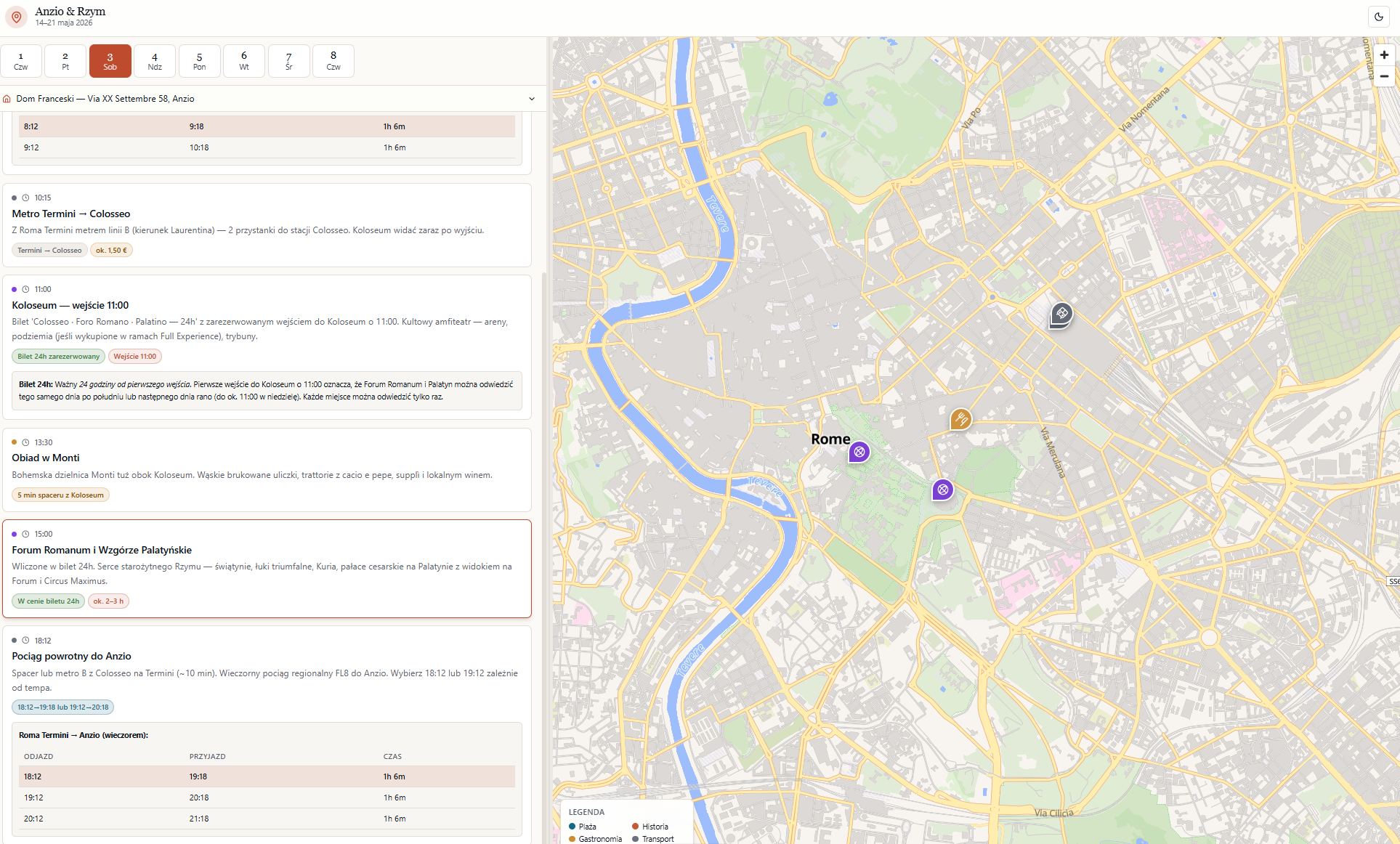
My first projects were deliberately small: travel guides and shared wish-list websites for family and friends travelling with me. I could describe the purpose, generate a version, review it in the browser and refine it through further prompts. This let me test an idea while I was still defining it.
That led me to more complex experiments in learning design and business operations. I now see Lovable as a full-stack AI development platform rather than a learning platform. It can generate a working web application with an interface, database, authentication and integrations, but those components still need requirements, testing and maintenance. Lovable’s documentation describes the platform in similar terms.
What I Have Built: Lovable for Learning Design and Beyond
The following projects moved me beyond demonstrations. Each tested Lovable against a different practical requirement.
A QQI mock-panel rehearsal tool
I created a QQI Mock Panel Rehearsal tool for a client preparing for a panel interview. Candidates can practise for roles such as managing director, administrator, learning-design specialist and quality-assurance director.
The tool presents one spoken question at a time. Candidates can type or dictate an answer, respond to structured follow-up questions and receive panel-style feedback against five pillars of a quality-assurance system. Sessions, scores and transcripts are saved so candidates can review their performance over time.
Lovable provides the interface. The question generation, evaluation and feedback run through n8n workflows connected to the application. This distinction matters: Lovable made the experience visible and usable, but it did not remove the need to define the evaluation criteria, build the workflows or decide what responsible feedback should look like.
I designed it as a rehearsal room rather than a general chatbot: calm, professional and focused on the system rather than the person. That narrow purpose made the interaction easier to design and test.
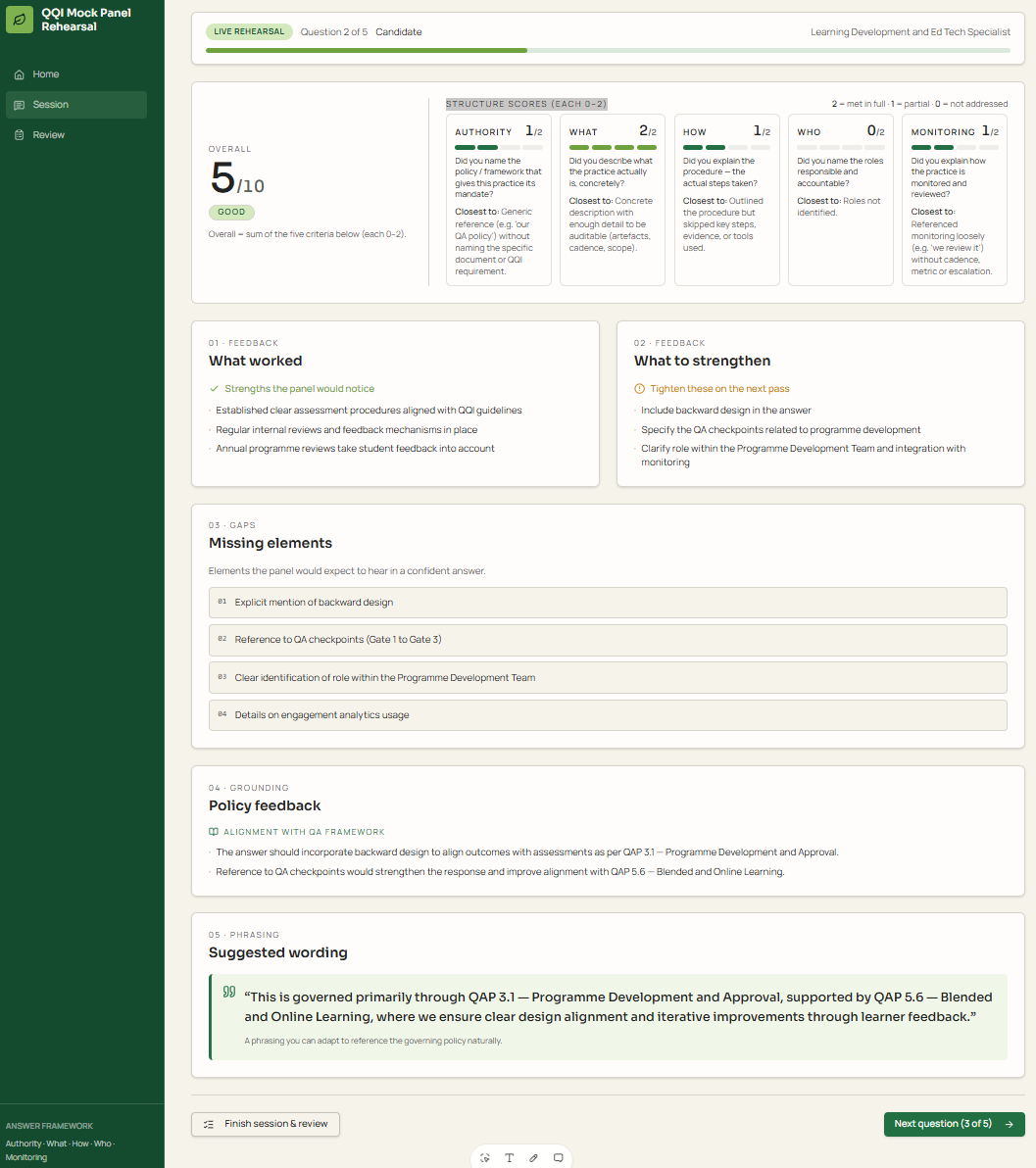
What it does
- Speaks panel questions aloud in an Irish English voice, just like a real panel would
- Records your spoken answer (speech-to-text in the browser) — no typing, you rehearse the way you’ll actually perform
- Lets you hear an exemplary answer in my own cloned voice, hidden behind a button so you attempt the question first
- Shows the exact policies to reference upfront (e.g. Digital Learning Environment), so answers are grounded in real institutional policy
- Evaluates every answer with AI — scoring each dimension 0–5, telling you what worked, what to strengthen, what was missing, and offering a stronger phrasing
- Follows up with a probing question — panel members may probe answers that need more detail, so does the app
- Saves every question, answer and score to a database, with full history review and CSV export (which also feeds my question bank in Google Sheets)
My business management suite
This was one of my first Lovable developments. It started as a small tool that would allow me to issue invoices across several branches of my business. Before this project, my business relied on separate tools for invoicing, estimates, filing and time tracking. Some systems came from my business partner when we merged our activities. With eLearning and two home and furniture-renovation branches under one roof, the tools did not communicate with one another.
I built one platform to manage all existing and any future branches. It now covers clients, projects, estimates, invoices, payments, contractor access, time recording and approvals, expenses and profitability reporting. Managers, office users and subcontractors have different access levels.
Receipts can be scanned from a phone, filed in Google Drive and processed through n8n. Vendor details, totals and VAT return to the system without someone entering every value twice.
This was not a one-prompt build. Early versions changed details I needed to preserve, including invoice numbering. Features such as discounts and internal client notes disappeared between planning iterations and had to be restored. Timer states and time calculations also needed troubleshooting. Those problems pushed me to introduce version control, feature branches, documented tests and role-based pilot testing.
The result is useful because it fits my workflow, not because Lovable automatically understood the business. The application depended on detailed requirements, sample documents, repeated checking and decisions about permissions and financial rules.
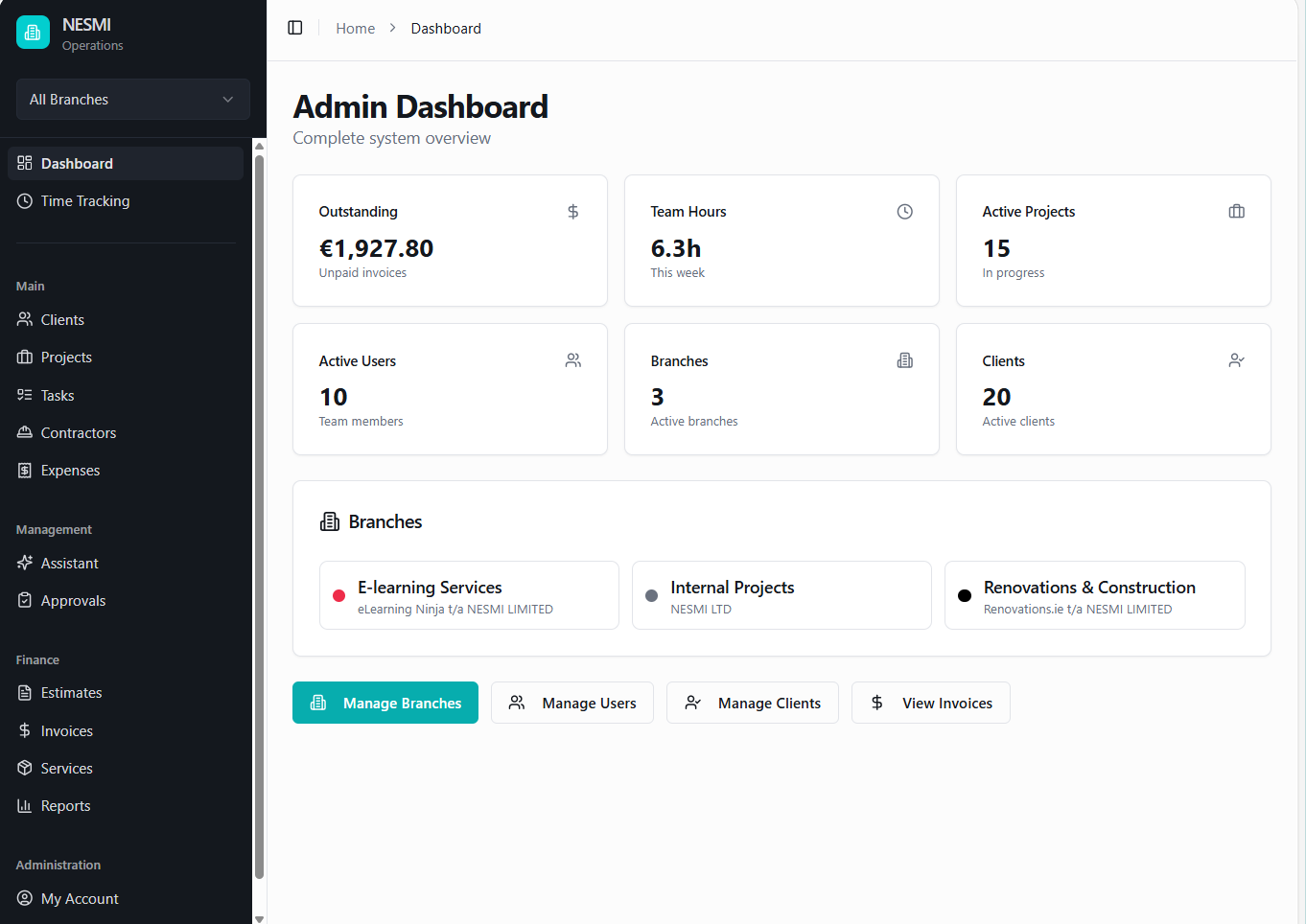
What it does
- Creates and sends invoices and estimates — tracked from draft through paid, with PDF generation, payment recording, and reminders
- Tracks working hours in real time — a running timer per person, weekly grids, and a multi-stage manager approval workflow
- Manages projects end to end — clients, budgets, task templates, contractor assignments and profitability all linked together
- Handles three branches under one roof — eLearning, Renovations and Online, each with its own branding, VAT rates and invoice numbering
- Gives every role exactly what they need — subcontractors, office staff, managers and admins each see their own tailored, permission-scoped view
- Scans receipts straight from a phone — multi-page capture, auto-named by client, project, date and branch, filed straight into Google Drive
- Logs expenses against projects — receipts attached, filtered by branch, client or project, rolled up into real project costs
- Answers the money questions instantly — cashflow charts, aged debtors, PSWT withholding tax, outstanding balances and fiscal-year reporting
- Automates billing from tracked time — turns approved team hours into invoice line items at each project’s billable rate
- Sends documents and emails to clients directly from the platform — with delivery history, logged per document
- Supports controlled access — role-based permissions, masked personnel data and restricted exports, subject to configuration and testing.
A Neurodiversity Hub Website
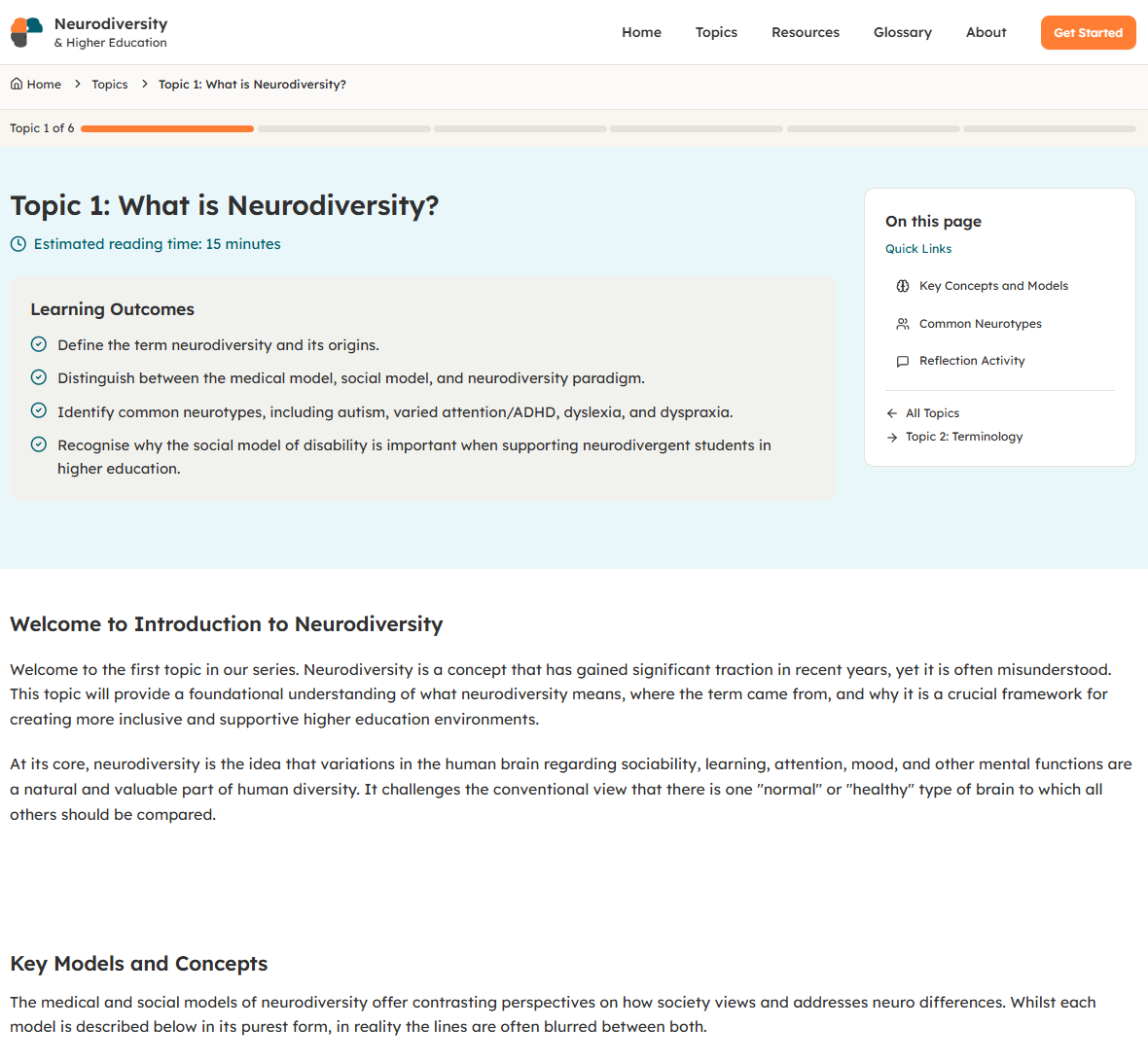
I also prototyped and built an open educational resource based on a short course created by neurodivergent students at Maynooth University. The site developed through a series of conversations rather than manual coding.
I supplied content in chat and as attachments, then refined six core topics, a glossary, resources and reflective activities. Typography, flashcards, page layouts, mobile behaviour and accessibility adjustments were reviewed through successive previews. Lovable produced a responsive React-based site and a reusable design system.
The client ultimately chose WordPress for the final website. That did not make the Lovable work wasted: the prototype gave us a working representation of the structure, interactions and visual direction. It also showed the boundary between designing a website in Lovable and moving that design into a different content-management system.
Where I Saves Time with Lovable
Lovable is most useful when I need to turn a concept into something people can see and test. A live prototype can expose missing requirements faster than a written specification alone.
It saves time in four areas:
- creating an initial interface and design direction;
- producing repeated components and responsive layouts;
- connecting a prototype to databases, authentication or APIs;
- making changes during stakeholder discussions and testing them immediately.
The saving is greatest at the beginning. It becomes smaller as the application gains complex permissions, business rules, integrations and exceptions. I therefore separate “time to first working screen” from “time to a dependable product”. They are not the same measurement.
The Hidden Work After the First Prototype
A convincing interface can create the impression that most of the work is finished. Often, it is the point where the less visible work begins.
A learner-facing application may still need a database structure, approved knowledge sources, user roles, authentication, error handling, analytics and a process for updating content. An AI interaction needs prompts, model settings, evaluation rules, fallback responses and decisions about what information can be sent to an external service. Voice features add speech recognition, audio generation, cost and accessibility considerations.
Testing also changes as the project develops. I check more than whether a button works. I test different roles, invalid inputs, empty states, mobile layouts, saved data, calculations and whether one user can access another user’s information. For larger applications, I use GitHub branches so changes can be reviewed and reversed instead of allowing every prompt to alter the live version.
Lovable can generate code quickly. It cannot decide which requirements are non-negotiable or recognise every unintended change. That remains my responsibility.
Security, Privacy and Accessibility Checks
This is where I had my biggest concerns. Lovable provides security scanning, secret storage and row-level security controls. Its documentation also warns that misconfigured row-level security is a common cause of data exposure. Basic policies may be generated automatically, but they still need review and user-by-user testing. Server-side functions using privileged access must enforce their own permission checks because they can bypass row-level security. Lovable’s security guidance explains these boundaries.
For a learning application, I check:
- what personal, assessment or voice data is collected;
- where that data is stored and which services receive it;
- whether users can access only their own records;
- whether API keys stay in server-side secret storage;
- how records can be corrected, exported or deleted;
- what happens when an integration fails;
- whether keyboard, screen-reader and mobile use have been tested.
Lovable states that its own platform aims to conform to WCAG 2.2 AA, but that does not automatically make every generated application accessible. I still need to test the application against the WCAG 2.2 requirements, including focus order, labels, contrast, zoom, error messages and alternatives for audio interactions.
When I Would—and Would Not—Use Lovable
I would consider Lovable for a rapid prototype, stakeholder demonstration, internal workflow, focused practice activity, job aid or small application with a clearly defined purpose. It can also suit a production application when there is enough technical capacity for testing, security, monitoring and maintenance.
I would be more cautious with accredited assessment, sensitive learner records, complex LMS reporting, large content libraries or any system that depends on SCORM or xAPI without custom integration. Lovable is not a direct substitute for an LMS or conventional authoring tool.
I also decide where the finished product should live. A Lovable application can use a custom domain or be deployed elsewhere from its codebase. WordPress can also act as a content source through Lovable’s official connectors. However, connecting to WordPress is not the same as converting a React application into a WordPress theme.
Third-party conversion tools may help with simple layouts, but interactive components, forms, application logic and content administration usually need manual redevelopment and testing. In the Neurodiversity Hub project, the Lovable prototype informed the WordPress build rather than transferring directly into it.
SEO needs similar planning. Lovable provides SEO tooling, but its documentation notes that client-side rendered applications may need prerendering so search and AI crawlers receive complete HTML. Prerendering is not included by default. For a content-heavy public website, WordPress or another established CMS may still be the more practical publishing environment.
Lovable in Training and Learning
Independent evidence about learning outcomes remains limited. Lovable provides education application templates, while its partnership with imagi Edu offers classroom access for learners in Grades 6–12. These examples confirm educational use; they do not prove instructional effectiveness.
That distinction matters. A generated quiz, dashboard or chatbot becomes a learning tool only when its content, practice, feedback and assessment decisions are designed properly.
A Decision Checklist for Learning Designers
Before building, I would ask:
- What problem should the application solve for the learner or organisation?
- Is a custom application needed, or would an LMS, form, website or existing tool do the job?
- Is this a prototype, an internal tool or a production system?
- What data will it collect, and who should be able to access each record?
- Which functions require a database, automation or external API?
- How will accuracy, accessibility, privacy and security be tested?
- Who will maintain the code, content and integrations after launch?
- Can the application be exported or migrated if the platform no longer fits?
- What is the non-AI alternative, and is it simpler?
My Current Position
Lovable has expanded what I can prototype and build without starting every project with manual coding. It has worked well for personal travel tools, a specialised rehearsal application, a multi-branch business suite and an educational website prototype.
I still do not treat the first generated version as a finished product. My decision depends on the users, data, learning purpose and long-term destination. For many learning-design projects, Lovable is strongest as a fast way to test the experience before committing to a production route.
For more practical resources on course design and AI-supported learning development, visit gerta.eu. If you have used Lovable or another AI app builder for a learning project, share what worked—and what required more work than expected—in the comments.