If you’re designing or managing an online course, you may have faced questions about what copyrighted materials you can include, how learner data is protected, or what accessibility standards you need to meet. These are not just theoretical concerns. They can affect legal compliance, learner trust, and the long-term quality of your course.
I learnt this the hard way. A client once gave me an image for a training site. I assumed they had the rights. The owner came after us for fees. That is why copyright for course creators is not a pre-launch tick-box. Credit is not permission, and “the client sent it” is not permission either.
This article is not legal advice, but a practical starting point for course creators and learning designers. Because many online courses reach learners across borders, I’ll look at both US examples and the EU landscape, with particular attention to rules that affect creators working with European learners, platforms, clients, or institutions.
Understanding Copyright for Course Creators
Copyright is one of the most misunderstood areas in online course design. In the US, discussions often start with fair use, where factors such as purpose, nature of the work, amount used, and market effect are weighed together. That can be helpful, but it is not a universal rule. In the EU, there is no broad equivalent to US fair use. EU copyright law relies on specific exceptions and limitations, including quotation, teaching, research, and text and data mining exceptions.
For online learning in Europe, the key development is Article 5 of the EU Copyright in the Digital Single Market Directive. It introduced a mandatory exception for digital and cross-border teaching, so educational establishments can use copyright-protected material for illustration for teaching, including through secure online learning environments. It is generally limited to what is necessary for the teaching purpose, usually needs to happen under the responsibility of an educational establishment, and is tied to secure environments such as a school or university VLE. Member States can implement the details differently, including how licences affect the exception.
Independent course creators, freelancers, commercial training providers, and membership-site owners should not rely on that exception. “It’s educational” does not automatically make the use lawful. Use licensed or original material, check Creative Commons terms carefully, copy only what you need, transform short extracts through critique or analysis, and get written permission when a third-party work is central to the learning experience.
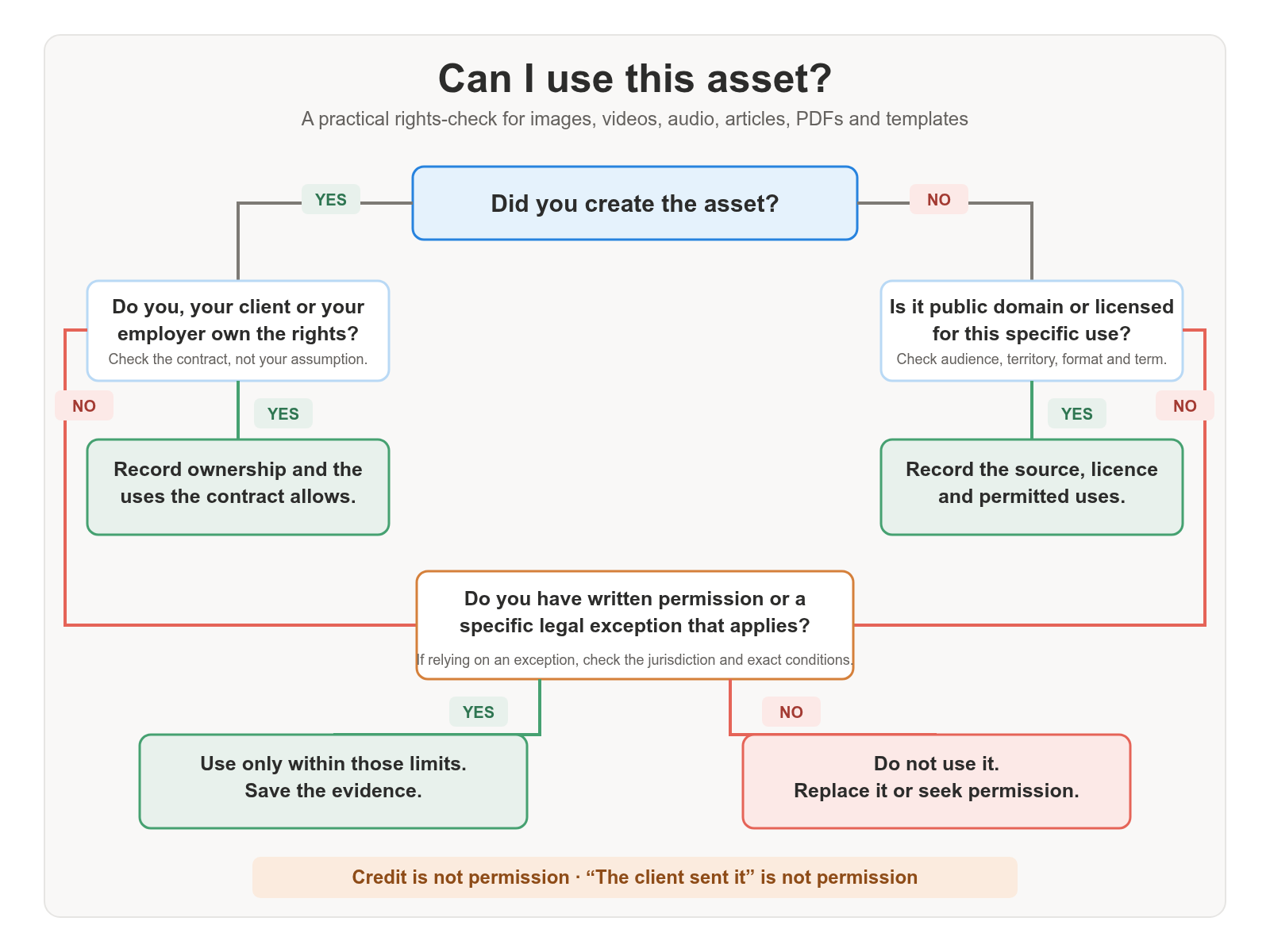
This also applies to client projects. If a client gives you images, videos, PDFs, brand assets, screenshots, or articles to include in a course, do not assume the client has the right to use them in that context. Ask for confirmation of rights, keep a simple asset register, and clarify whether the materials can be used in internal training, public courses, paid programmes, downloadable resources, or marketing content.
Copyright also covers your own course assets, including slides, assessments, scripts, worksheets, and course structure. Depending on your contract with a client, institution, or platform, ownership rights can vary widely. Clear IP agreements upfront can prevent messy disputes later.
GDPR and Data Privacy: What Online Course Creators Need to Know
Privacy is another growing concern, especially around learner tracking. In the US, some major platforms have faced claims under the Video Privacy Protection Act for sharing learner video-watching histories and personal data with third parties such as Meta without proper consent. Even when claims are dismissed, settlements and reputational damage can still be significant.
In Europe, the main framework is the General Data Protection Regulation (GDPR), alongside the ePrivacy Directive and national cookie-consent rules. If your course site, LMS, checkout page, webinar platform, or email funnel uses tracking pixels, embedded video analytics, heatmaps, advertising cookies, or learner-behaviour dashboards, you may be processing personal data.
For course creators, the practical questions are: what learner data is collected, why is it collected, who receives it, and how long is it kept? If a learner watches a lesson, downloads a resource, abandons checkout, clicks an email, or completes a quiz, that behaviour can become personal data when linked to an account, email address, device ID, cookie ID, or advertising profile.
A good working habit is to review your privacy notice regularly, check which third-party tools are embedded in your LMS or course pages, and only enable tracking when it supports a clear learning or business purpose. For EU learners, make sure your consent flow, privacy notice, data-sharing terms, and international transfer position are all defensible.
New Accessibility Standards Are Shaping Course Design
Accessibility law has sharpened. The European Accessibility Act has applied since 28 June 2025 and sets accessibility requirements for specified products and services offered to consumers in the EU, including some digital services. For learning providers, this can affect the learner journey around digital courses, platforms, assessments, support, payment flows, e-books, mobile learning apps, and customer-facing learning services, depending on the business model and service type.
In the US, the Department of Justice’s 2024 Title II rule sets WCAG 2.1 AA as the technical standard for the web content and mobile apps of state and local governments, which can include public colleges and universities. Compliance dates vary, and the position for private providers is different. I use WCAG 2.2 AA as the current design target while recognising that some legal rules still cite WCAG 2.1 AA. In Europe, also check whether EN 301 549 applies to the platform or digital service you are using.
Accessibility should not be treated as a final QA task. Course pages, videos, PDFs, quizzes, downloads, navigation, forms, checkout pages, and learner support routes all need to be usable by people using assistive technologies. Build captions, transcripts, alt text, meaningful link text, keyboard access, readable colour contrast, logical headings, accessible documents, and clear error messages into the workflow from the start. That reduces the cost of retrofitting later and usually improves the course for everyone.
A note on AI voices
If you use a cloned or synthetic voice, get written consent from the person whose voice you are using and tell learners when the narration is not human. I am covering the wider AI-legal questions — training data, tool licences, disclosure, and learner data inside AI features — separately – check our posts in the Legal and Compliance category.
Platform Terms, IP Ownership, and Course Assets
Platform and client terms shape what you can include and who owns the files afterwards. When you use an LMS, authoring tool, stock library, or a client-owned platform, check whether you keep ownership of your course materials, what licence you grant, and whether you can reuse the same slides, scripts and source files elsewhere.
This is especially relevant for learning designers working with clients. A course may include your original structure, scripts, slide design, worksheets, assessments, templates, animations, stock images, voice-over, and client-provided materials. Before publication, clarify who owns the final course, who owns the editable source files, whether the client can reuse the materials internally, whether you can show samples in your portfolio, and whether third-party assets are licensed for the intended audience and territory.
If you work with institutions, also check faculty or contractor IP policies. Some institutions let educators retain copyright in teaching materials, while others claim rights over course structure, curriculum, recordings, or platform-hosted content. Do not rely on assumptions or implied permissions; put the main terms in writing.
Your next steps
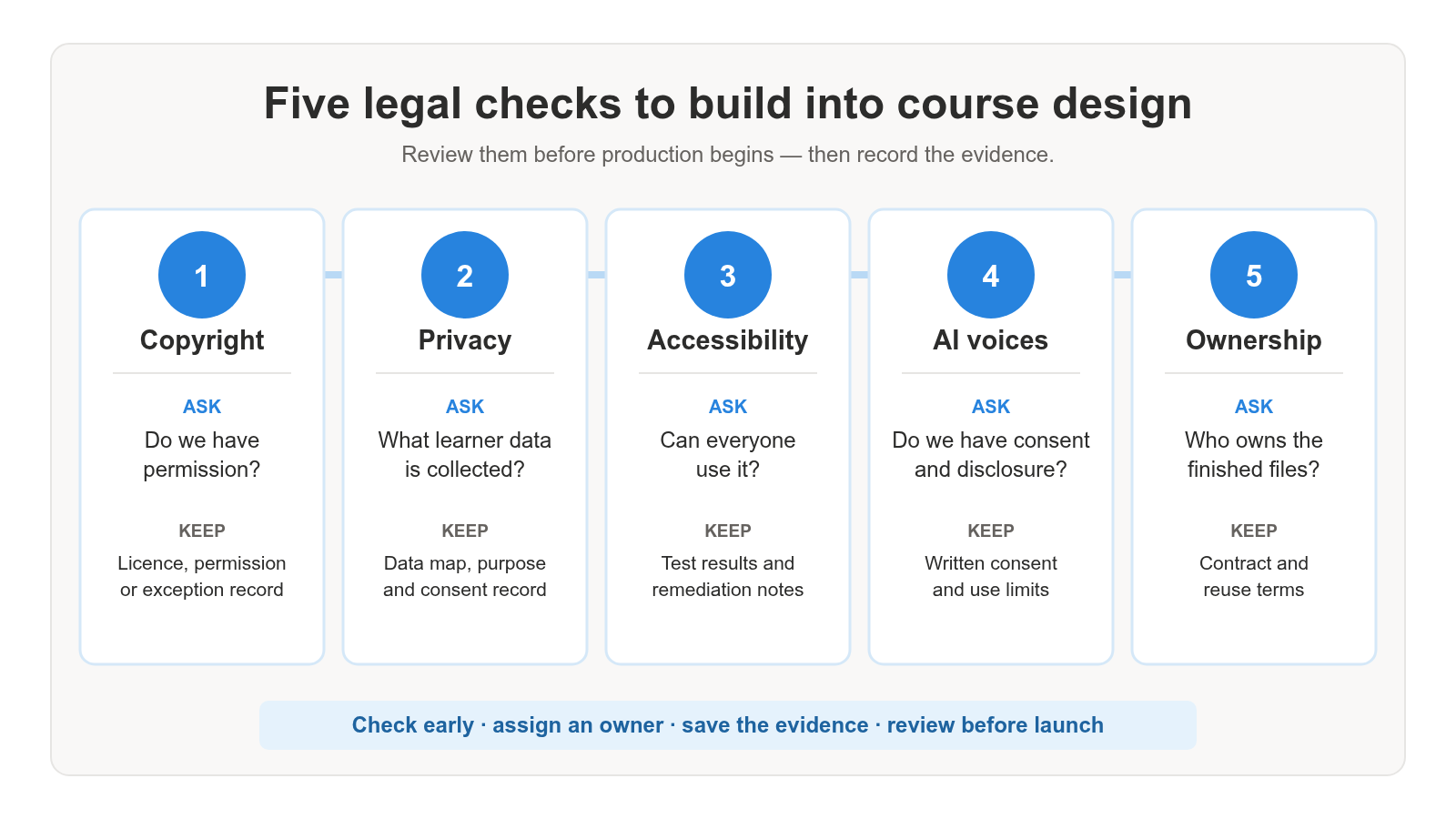
Before you publish or update a course, run this check:
☐ Access. Materials are limited to enrolled learners while the course runs.
☐ Learner data. Your privacy notice says what you collect, which tools receive it, and why. Tracking is on only where it has a clear purpose.
☐ Accessibility. Captions, transcripts, alt text, colour contrast, keyboard access and document structure are built in. Design to WCAG 2.2 AA.
☐ AI voices. Written consent is on file, and learners are told if the narration is synthetic.
☐ Ownership. Who owns the finished course, the source files, and any reuse rights is in writing — including portfolio use and third-party asset limits.
Check our posts under the Legal and Compliance category.
If you need help building these checks into your learning design workflow, explore my services at gerta.eu or share your questions in the comments.
FAQ
Can I use a copyrighted image in my online course if I credit the creator?
No. Credit alone does not grant permission. You need a licence, explicit permission, public-domain status, or a specific copyright exception that applies in your jurisdiction. For independent or commercial course creators, it is safer to use properly licensed or original images rather than rely on educational-use assumptions.
Is tracking learner activity with tools like Meta Pixel legal?
It can be risky without proper transparency, consent, and data-transfer checks. Meta Pixel and similar tools can transmit page visits, button clicks, checkout activity, account information, or learning-related behaviour to a third party. If that data can be linked to a learner, it may be personal data. For EU learners, check your lawful basis, consent flow, privacy notice, data-sharing terms, and international transfer position before adding tracking pixels to course pages, sales funnels, or learning platforms.
Do accessibility laws apply to private online course creators?
It depends on the jurisdiction, organisation, and service. In the US, public institutions and some private providers may be covered by accessibility rules. In Europe, public-sector bodies are covered by EU web accessibility requirements, and the European Accessibility Act has applied since 28 June 2025 to a range of consumer-facing products and services. For course creators, WCAG 2.2 AA is the design target, WCAG 2.1 AA is the older baseline still cited in some rules, and EN 301 549 remains a useful platform benchmark, even where the exact legal position is not straightforward.
What should I do if I want to use AI voice cloning for my course narration?
Obtain explicit, written consent, limit use scope, store voice data securely, and disclose AI involvement to learners.
Who usually owns the copyright to an online course created by a university lecturer?
Typically, lecturers own the rights unless a contract assigns ownership to the institution or platform. Check agreements carefully.
Is there a European equivalent of fair use for online courses?
Not exactly. The EU does not have a broad fair-use defence like the US. It relies on specific copyright exceptions, including quotation and teaching exceptions. For online learning, Article 5 of the EU Copyright in the Digital Single Market Directive supports certain digital and cross-border teaching uses, but mainly under the responsibility of educational establishments and usually within secure learning environments. Independent or commercial course creators should check licences, permissions, and national rules rather than assuming educational use is automatically allowed.
Sources and Reading
- U.S. Copyright Office — Fair Use Index
- EUR-Lex — Directive (EU) 2019/790 on Copyright in the Digital Single Market
- European Commission — Data Protection under the GDPR
- European Commission — Legal Grounds for Processing Personal Data
- European Commission — ePrivacy Directive
- European Commission — European Accessibility Act
- U.S. Department of Justice — Title II Web and Mobile Accessibility Rule
- W3C — Web Content Accessibility Guidelines 2.2
- ETSI — EN 301 549 Accessibility Requirements for ICT Products and Services