When someone asks me to help create a course and “just set it up on a platform”, the conversation usually gets a little longer than they expected. They may already have looked at Thinkific, LearnDash, Kajabi or a few other options. Sometimes they have a favourite before we have discussed what the course will involve.
I understand the appeal of starting there. A platform feels like a tangible decision: choose a subscription, upload the material and get going. But in my work, the questions that shape that choice often have very little to do with the platform at first.
How will the course fit into the business? Who will learn, and what will they actually do? Who will look after it once it is live?
When I help someone choose the right course platform, that is where I like to start. Once I understand the wider picture, the feature comparison becomes much more useful. I can look at the functions that matter, how much they matter, and how well each option supports them.
This is a look at how I approach that conversation as a learning designer and consultant. It is not a ranking of platforms or a method I expect everyone to follow exactly. The amount of detail depends on the project. Sometimes a small comparison table is enough; sometimes there is quite a bit more to work through.
Discovery questions to ask before you choose the right course platform
I don’t need to be an expert in the subject someone wants to teach. I do need to understand enough about their plans to see what the course and the people running it will need.
Two projects can both be described as “an online course” and mean quite different things. A self-paced product sold to individuals is not the same operation as a cohort programme with live teaching, submitted assignments and tutor feedback. Those are examples, rather than two specific client stories, but they show why I find the early questions useful.
The business and the offer
I usually begin with what the course is meant to do for the business or organisation.
- Is it a paid product, a lead magnet, staff training or part of a certificate programme?
- Is this one course, or the beginning of a catalogue or membership?
- Will people pay individually, through a subscription or payment plan, or will an employer buy places for a group?
- What is available for setup, and what ongoing cost feels manageable?
- Who will run it after launch?
I am interested in the work around the course as well as the lessons themselves. Sales, enrolment, payment, learner support and administration all have to happen somewhere. I want to see which parts the platform is expected to handle and which will stay elsewhere.
The learners and their learning context
Then I want to know who the course is for and how it will fit into their day.
- What should learners be able to do after the course?
- Are they customers, employees, members or an existing student group?
- Will they mostly use a phone, a laptop or both?
- Will they work independently, join scheduled sessions or move through the material as a cohort?
- Are there language, accessibility or connectivity needs to consider?
“Mobile-friendly” means more to me when I know what the learner needs to do on that phone. Watching a video, contributing to a discussion and submitting an assignment are quite different activities to check.
The course, the teaching and the assessment
I also ask how much of the course already exists. Sometimes there is a finished set of materials; sometimes there is an outline and a folder of documents. Those are different starting points for the project, not just different amounts of uploading.
- What will learners read, watch, practise, discuss or create?
- Will there be quizzes, assignments, demonstrations or workplace evidence?
- Who will mark work and give feedback?
- What counts as completion?
- Are certificates, badges or records needed, and who will use them?
This is where my learning-design work overlaps with the platform discussion. I don’t want to choose a system around video hosting if the course then develops into something with substantial practice, tutor feedback and assessed work.
The people doing the everyday work
The learner experience gets a lot of attention, but I want to understand the administrator’s experience too.
Who will add learners, change a cohort, answer access questions, update content and check progress? Do subject experts need to review material? Will several clients need separate spaces? What happens when someone misses a session or needs another attempt at an assessment?
I find those questions more useful than asking whether a platform is “easy to manage”. They give me something concrete to compare. For example, can the person coordinating the course enrol a group and export the report they need without asking a developer each time? I’ve written more about this side of the work in Stage 5: Online Course Delivery.
The existing technical setup
I also want to know what is already in place: the website, payment system, email tools, CRM and any learning tools the organisation uses.
A WordPress site is part of that conversation, but so is the person maintaining it. Having a website doesn’t automatically mean that adding the learning environment to it is the most comfortable option for the team.
Data handling, accessibility and AI use belong in this discussion too. I want to know what requirements or restrictions apply, rather than discover them after everyone has become attached to a particular product. Where a decision needs approval from someone else in the organisation, I would rather know that early. If you sell courses to consumers in the EU, for example, the European Accessibility Act has applied to e-commerce services since 28 June 2025, so it’s worth checking early whether and how it applies to you.
I have written separately about LMS versus standalone online learning platforms. Here, I am more concerned with the questions that help me understand which type of setup is worth exploring.
What might change later
Finally, I ask about the next stage. Not every possible future version of the business, but the changes that seem reasonably likely.
Will another course follow? Could individual sales turn into contracts with organisations? Might the course need more languages, more administrators or different reporting?
I also want to understand the exit: what happens to content and learner records if the platform no longer fits? I am not looking for a system that anticipates everything. I am trying to avoid an obvious limitation without paying for complexity nobody wants to manage.
How I move from discovery to a comparison
Once I understand the business expectations and the way the course will operate, I can start comparing functionality. This is where I use a matrix or rubric to make the discussion less dependent on whichever sales page looks most convincing.
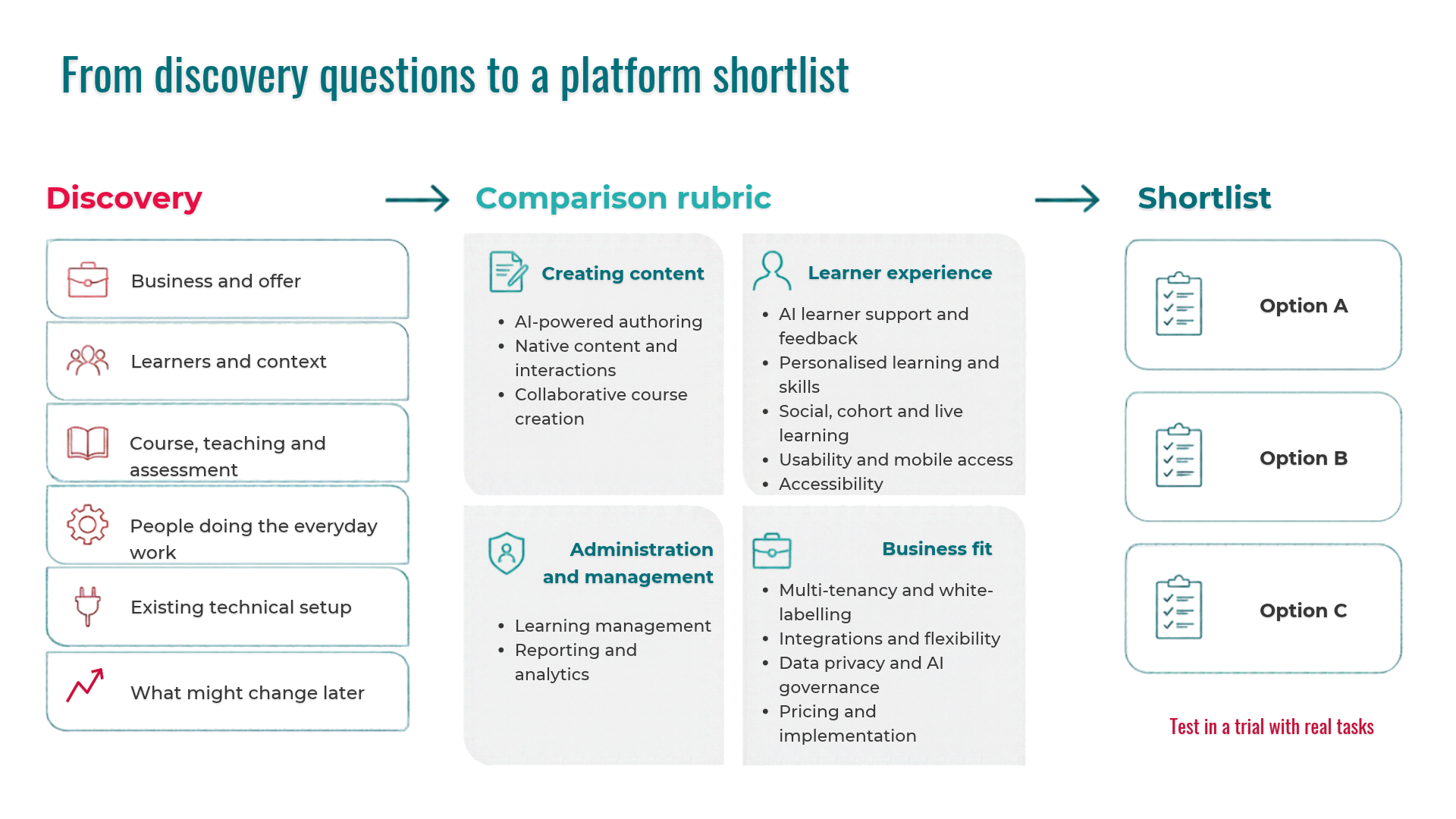
By “rubric”, I mean a set of comparison criteria with a shared understanding of what a good result looks like. It can be as simple or as detailed as the project needs.
There are 14 comparison categories, grouped into four broader areas. I use these as a starting point, not as 14 things every project has to buy. Some may carry very little weight; others may decide whether a platform stays on the shortlist at all.
Creating content
1. AI-powered authoring
I look at what the authoring features would help us do: work from source documents, draft an outline, adapt material or create questions, for example. I am also interested in the work left afterwards. A quick first draft is less useful if reviewing and correcting it becomes awkward. As an example of what’s out there, LearnWorlds’ AI Assistant can generate a course outline and assessment questions, and its help pages tell you to review the questions, answers and feedback yourself. That review step is the part I’d want to try.
2. Native content and interactions
Here I compare what we can build inside the platform with what the course needs. That might include lessons, quizzes, assignments or more interactive activities. I want to see where we would need another authoring tool and what that would add to the workflow and cost. H5P is a good example: I’ve used it for interactive video, and whether a platform supports it natively, through a plugin or not at all changes the workflow quite a bit.
3. Collaborative course creation
If several people are involved, I look at how they can contribute, review and approve material. Permissions, comments and versions may not be the most eye-catching features, but they affect how comfortably authors and subject experts can work together.
Learner experience
4. AI learner support and feedback
For an AI assistant or feedback feature, I want to understand what it draws on, how useful its answers are and what happens when it gets something wrong. I also look at where a learner can reach a person. I wouldn’t treat the presence of a chatbot as evidence that learner support is covered.
5. Personalised learning and skills
I ask whether different routes, recommendations or skills tracking would serve this particular course. If everyone needs to complete the same short programme, extensive personalisation may add little. For a broader learning offer, it may deserve much more attention.
6. Social, cohort and live learning
This covers discussion, group activities, scheduled teaching and the experience of learning with others. I want to see how these parts connect to the course, as well as who will facilitate them. A discussion space and an active learning community are not quite the same thing.
7. Usability and mobile access
I am interested in ordinary tasks: finding the next lesson, returning to unfinished work, joining a session or submitting an activity. I want to see those tasks from the learner’s side and on the devices they are likely to use, not only in the administrator’s view.
8. Accessibility
I consider accessibility separately from general ease of use. I want to understand what the platform supports, what depends on the way we build the content and what needs testing in the actual course. Where specialist assessment is needed, a reassuring feature label wouldn’t replace it.
One useful thing to ask for is the platform’s accessibility conformance report. Moodle, for example, publishes one against WCAG 2.2 Level AA, based on an external audit. A report like that tells you what the platform itself supports, but your own content still needs checking. I’ve listed what I look at there in 18 aspects of accessibility in online courses.
Administration and management
9. Learning management
This includes enrolment, permissions, groups, progress, completion and certificates. I compare these against the day-to-day work we discussed earlier, including the exceptions: a learner changing group, repeating an assessment or needing access extended.
10. Reporting and analytics
I start with the questions the course team needs to answer. Who has completed the training? Which assignments still need feedback? Can a client see the progress of their own group? That gives me a more useful basis for comparison than the number of dashboards available.
Business fit
11. Multi-tenancy and white-labelling
I look at whether different clients or organisations need their own spaces, administrators, reports or branding. Multi-tenancy is about those separate environments; white-labelling is about how much the platform can appear under the organisation’s own identity. A project may need one, both or neither. TalentLMS is one example of how this can work: its Branches are separate sub-portals, each with its own URL, branding, course catalogue and admins. The number of branches depends on the plan, which is exactly the kind of detail that ends up in the pricing conversation.
12. Integrations and flexibility
I compare how the platform would connect to the rest of the setup. I want to distinguish a connection that is already supported from one that needs another subscription, manual work or custom development. “It integrates” can leave quite a few practical questions unanswered.
13. Data privacy and AI governance
Here I look at the information needed to review data handling, access, retention and AI use. I also want to know who needs to approve those arrangements. This is part of understanding whether the platform fits the organisation, not something I would settle by giving a privacy page a quick read. If the platform has AI features, it’s also worth knowing that the EU AI Act has required organisations using AI systems to make sure their staff have sufficient AI literacy since February 2025. For the wider checks, see my post on copyright, privacy and accessibility for course creators.
14. Pricing and implementation
I look beyond the headline subscription to the plan we would need, add-ons, fees, setup, migration, support and the team’s time. I also consider how much work it would take to get from a trial account to a course people can actually use.
How I think about weighting and scoring
I don’t find it useful to give all 14 categories the same importance. The weight comes from the discovery conversation. If tutor-marked assignments are central to the course, that workflow should matter more than an attractive feature we might never use.
A simple version of the rubric could use a priority weight from 1 to 5 and a fit score from 0 to 4:
| Fit score | What it could mean |
|---|---|
| 0 | We have checked, and the requirement is not supported. |
| 1 | It is possible only with a substantial workaround. |
| 2 | It is partly supported, with extra tools or effort. |
| 3 | It meets the need with a manageable gap. |
| 4 | It fits the need well in the workflow we have checked. |
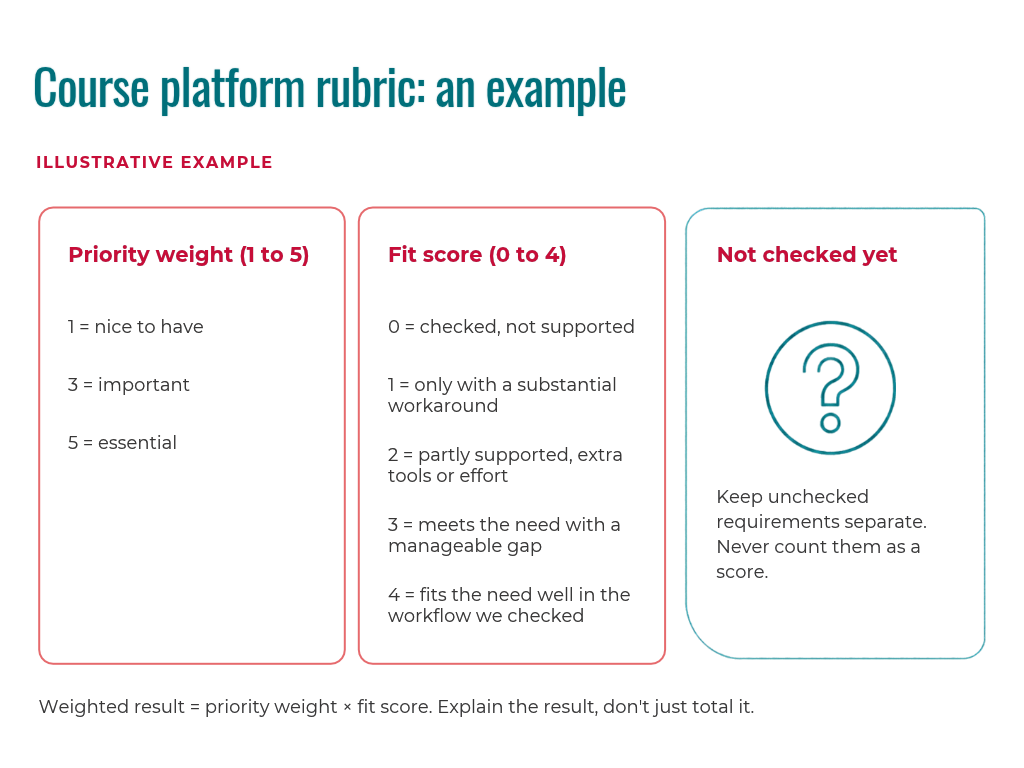
That is an example scale, not a fixed formula I would apply unchanged to every project. I would agree what the scores mean for the particular requirements. I would also keep “not checked yet” separate from “not supported”.
To show how the comparison might look, here is an illustrative example, not a record of a client project or a comparison of real products:
| Criterion | Priority weight | Platform A fit | Platform B fit | What I would still want to check |
|---|---|---|---|---|
| Social, cohort and live learning | 5 | 3 | 2 | Group enrolment, session access and missed-session follow-up |
| Usability and mobile access | 4 | 3 | 4 | Completing the planned activities on a phone |
| AI-powered authoring | 2 | 4 | 2 | Review controls and availability on the intended plan |
| Accessibility | 5 | Not checked | Not checked | The course experience and relevant accessibility requirements |
The weight and fit score can be multiplied to give a weighted result. What matters more to me is being able to explain the result: why does one option fit better, what extra work does it involve, and what have we not checked?
I wouldn’t use an overall total to dismiss an unresolved requirement. In this example, accessibility still needs attention. A high score elsewhere does not answer that question.
There is also room for judgement. A function may technically be available but feel cumbersome to the person who will use it every week. I want that reaction recorded alongside the score, rather than lost because the feature box can be ticked.
What I want to see in a trial or demonstration
The rubric gives me something specific to ask about. Instead of a general tour, I want to follow a small piece of the work we expect to do.
For a course with assignments, that might mean building a short lesson, enrolling a test learner, submitting work, giving feedback and checking how it appears to the learner. For a training team, it might mean enrolling a group and producing the report their manager needs.
I am looking at the effort as well as the result. How many steps are involved? What needs an extra tool? Can the person responsible for the course do it comfortably?
For AI features, I want to try approved sample material and look at the output and review process. For pricing, I want to know which plan the demonstration reflects. A feature shown in a demo is only useful to the comparison if we know whether it is included in the setup being considered.
Where the comparison leaves me
I am not expecting a spreadsheet to choose the platform for us. I use it to make the reasoning visible: what we need, what each option offers, what it would cost and which compromises we are comfortable making.
Sometimes that means choosing something simpler. Sometimes the extra cost or administration is justified by the way the programme needs to run. I am more interested in being able to explain that choice than in declaring one product the best.
For me, this is why the conversation before the comparison matters. It gives the features some context. We are no longer asking whether a platform has a community, an AI assistant or a reporting dashboard. We are asking whether those things help this course, these learners and the people running it.
If you are at that stage yourself, I would be interested to hear which question is proving hardest to answer. Is it the course model, the ongoing administration, the cost, or deciding what you genuinely need now?
And if you’re a step earlier and still shaping the course itself, choosing the right instructional strategies for your course format is a good place to start.
References
- Directive (EU) 2019/882 on accessibility requirements for products and services (European Accessibility Act), EUR-Lex
- Web Content Accessibility Guidelines (WCAG) 2.2, W3C
- AI talent, skills and literacy, European Commission
- Moodle accessibility conformance report (VPAT), MoodleDocs
- Creating a course with AI, LearnWorlds Help Center
- Branches, TalentLMS
- LMS vs Standalone Online Learning Platforms, gerta.eu