
When I design an online content, I know that even strong content can fall flat if learners do not feel able or willing to take part. Engagement is shaped by the course design, the relevance of the activities, the support learners receive and the other demands competing for their time. Recent research continues to identify teaching presence, interaction, feedback and well-organised learning activities as significant influences on online engagement (Frontiers in Psychology, 2025).
In this post, I share 12 practical ways to keep online learners interested and involved. Some of these online learner engagement strategies come from my own projects; others are supported by research and established practice in adult and online education. Treat them as a menu rather than a checklist: select what fits your learners, purpose and delivery context.
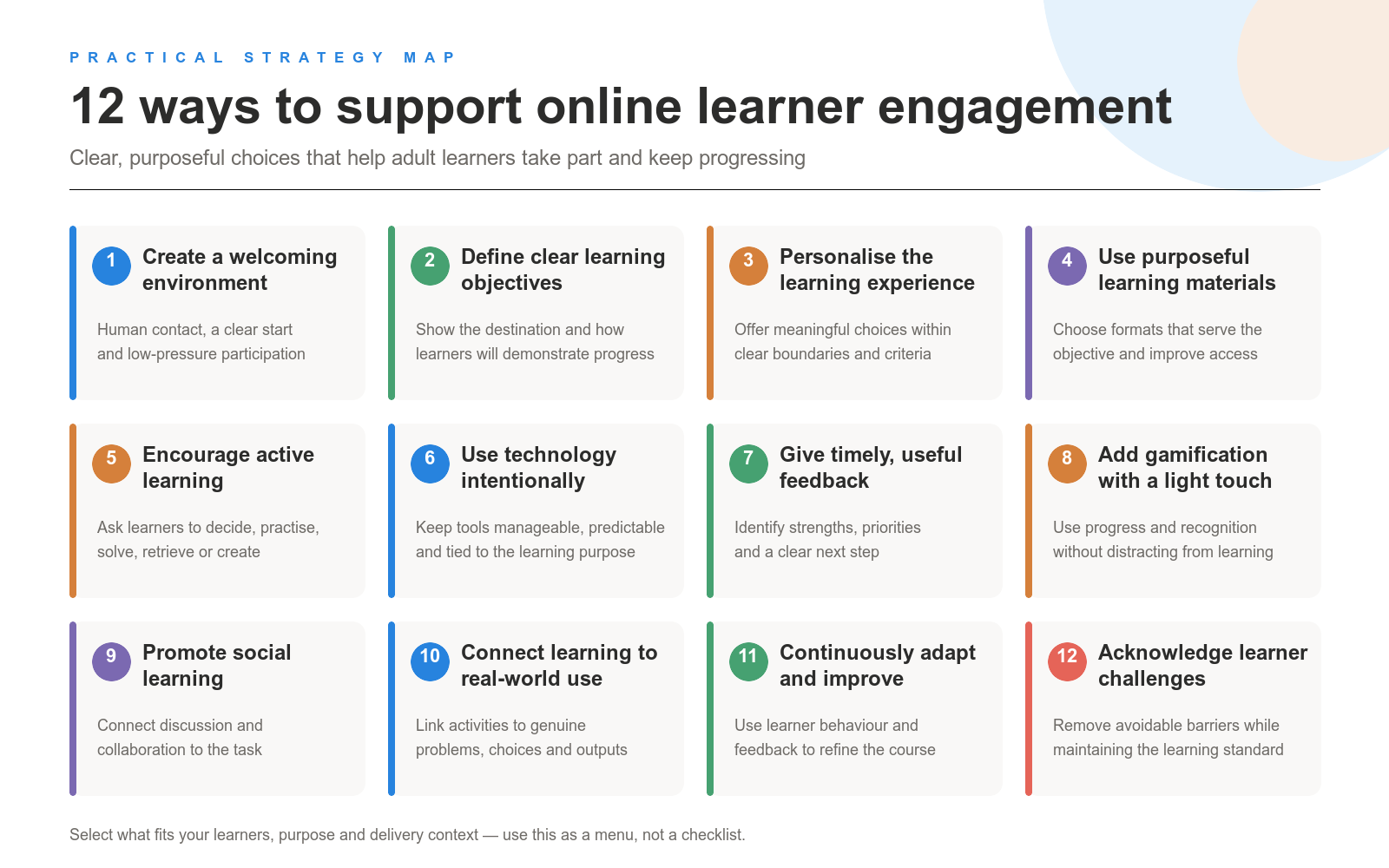
Before looking at the strategies, it helps to acknowledge the reality of online study. Learners may be balancing work, family and study. They may use older devices, rely on an unreliable internet connection or have different levels of digital confidence. Not every approach will work equally well for every group, so course teams need to test, review and adjust their choices.
1. Start with a Welcoming Learning Environment
First impressions matter. I try to make the first contact feel human, welcoming and clear, so learners understand who their tutor is, what the course covers and how participation will work. This can reduce avoidable uncertainty and set expectations for the learning relationship.
The first time I ran a fully online course, I underestimated how much a simple welcome video would matter. Learners mentioned it repeatedly in their feedback. I now usually keep introductory videos under three minutes and pair them with a clear Start here page and a low-pressure opening activity.
For a cohort-based course, I might ask learners to post a short introduction with a relevant personal detail and respond to two other contributions. The purpose is not forced social activity; it is to show that there are real people on the other side of the screen and establish an early reason to participate.
2. Define Clear Learning Objectives
When learners understand what they are working towards, they can make better decisions about their time and monitor their own progress. Clear objectives also help adults judge how the course connects with their goals.
In a digital marketing course I worked on, each module started with three to five objectives, such as “Explain the basics of SEO” or “Design a simple social media campaign for your organisation”. At the end of the module, learners completed a short quiz or task directly connected to those objectives.
That small loop—here is what you will learn; here is how you will demonstrate it—makes the route through the module easier to understand.
3. Personalise the Learning Experience
Adult learners bring different goals, constraints and experience to a course. Where the learning outcome allows it, I give learners meaningful choices, particularly in projects and assessments.
In one professional-development course, learners selected a final project that matched their context. Some created presentations, others designed learning activities for their teams, and several developed a case study from their organisation. The assessment criteria remained consistent, but the format and subject could vary.
This type of personalisation supports autonomy without creating a completely different course for every learner. Research has linked learner autonomy with motivation, but choice still needs clear boundaries and support (Wiley).
4. Use a Purposeful Range of Materials
Online, a repetitive pattern of pages and videos can make participation feel passive. I use a mix of reading, demonstration, audio, video and practice when the variation serves the objective—not simply to make the course look more interactive.
For example, in an online history course, a short animation might introduce a sequence of events, while an article or downloadable document provides more detail. A timeline can help learners examine chronology, followed by a short question asking them to compare events or perspectives.
Offering information in more than one format can also improve access, particularly when videos include captions and transcripts and documents are structured for assistive technology. My test is straightforward: Does this format help the learner do what the objective requires?
5. Encourage Active Learning
Uploading slides or videos and asking learners to “go through the content” provides few opportunities to apply, test or discuss what they are learning. Active learning asks learners to make decisions, solve problems, retrieve information or create something relevant.
In an entrepreneurship course, learners designed a mock start-up. Working in small groups, they developed a basic business plan, conducted market research and recorded a short pitch. We used shared documents for planning, a forum for questions and optional video calls for group check-ins.
The technology was simple, but the task required learners to apply concepts and justify decisions. Research on active learning supports the use of learner-centred activities while also showing that the activity must be designed and facilitated carefully (PMC).
6. Use Technology Intentionally
There are hundreds of tools that could be added to a course, which is why I try to use as few as the design requires. Engagement depends more on the quality and purpose of interaction than on the number of applications involved.
In practice, I might use the LMS for announcements and core content, one defined space for discussion and one tool for collaborative work. For a synchronous session, video conferencing, breakout rooms and a shared notes document may be enough.
Predictability matters, especially for learners with lower digital confidence. Learners should know where to find instructions, where to submit work and which channel to use when they need help.
7. Give Timely and Constructive Feedback
Feedback can support motivation when it is specific, respectful and useful. Learners need to understand what they did well, what requires attention and what action they should take next.
For human feedback, I set a realistic turnaround time and use an approved rubric or feedback criteria. I normally identify one or two strengths, explain one or two priorities for improvement and give a concrete suggestion. Peer feedback can also help learners compare approaches, provided they receive clear criteria and guidance on how to comment constructively.
I have also used programmed language models to provide an initial response and support a follow-up conversation. I do not treat that output as automatically dependable. For AI-generated feedback, I:
- use an approved rubric or defined feedback criteria;
- test the output for accuracy, consistency and alignment with the learning outcome;
- tell learners when AI is involved;
- avoid sending personal, confidential or sensitive work to an unapproved system;
- provide a route to human clarification or review.
Current research on automated feedback highlights the need for domain expertise, transparency and human oversight, particularly where feedback affects assessment or progression (Online Learning Journal, 2024).
8. Add Gamification with a Light Touch
Gamification does not require a complete game. Progress indicators, badges, optional challenges or recognition can help learners see movement through a course.
In a coding bootcamp-style programme, I used module badges and a visible progress tracker in the LMS. Weekly coding challenges provided optional points and recognition in a small leaderboard.
These elements may support motivation and participation when they reinforce meaningful goals, progress and feedback. They can also distract or discourage learners when they reward activity without learning, create unwanted competition or become the main reason for participating. Recent systematic reviews describe mixed and context-dependent results rather than a guaranteed benefit (Open Praxis, 2025).
9. Promote Social Learning and Collaboration
Online learning can feel isolating when communication is entirely one-way. Social presence—the sense that tutors and other learners are genuinely present—can support participation and satisfaction when it is connected to the learning task (PMC).
In a healthcare course I supported, learners analysed patient scenarios in small groups, discussed treatment options in a shared document and forum thread, and posted a short summary for the cohort. We kept the tools limited to the LMS forum, one shared document and an optional live question-and-answer session.
I have also used online meeting transcription followed by an AI-supported review to identify possible gaps or misconceptions in a group discussion. In that situation, learners need to know that transcription and AI are being used, understand where the transcript will go, and have an alternative if they do not want their contribution processed in that way. The AI output should prompt further checking rather than act as the final group conclusion.
10. Connect Content to Real-World Applications
Adult learners are more likely to invest effort when they can see how an activity relates to a problem, decision or task outside the course. Abstract content with no visible application is easy to postpone.
In an environmental-science course, learners developed a sustainability proposal for their community or workplace. Some focused on waste reduction, while others examined transport or energy use. They presented their proposal in a short video or slide deck and received peer feedback.
The task gave learners a reason to use the subject matter and resulted in something they could potentially adapt after the course.
11. Continuously Adapt and Improve
I rarely get a course completely right on the first run. I treat each delivery as an opportunity to observe where learners hesitate, ask for clarification or stop participating.
In a course for sales professionals, I added a short mid-course survey covering pacing, workload and the usefulness of activities. Responses showed that learners wanted more time for questions and worked examples. We added another live question-and-answer session and simplified one assignment.
The adjustment was small, but it responded to evidence from the current group rather than relying only on assumptions made during development.
12. Acknowledge the Challenges Learners Face
Online learners may be tired, distracted or balancing several responsibilities. Acknowledging these constraints does not mean lowering the standard of the learning outcome. It means removing avoidable barriers.
Depending on the course, I might:
- provide a transcript as well as a video;
- allow reasonable flexibility around deadlines;
- divide a larger task into smaller stages;
- provide clear instructions and examples;
- add short checklists or recaps showing what comes next;
- make support routes easy to find.
These adjustments can help learners with time constraints, variable schedules, disabilities or lower digital confidence stay oriented without reducing what they are expected to learn.
Bringing the Strategies Together
Keeping online learners engaged is not a task that can be completed once during course design. It requires a suitable combination of clear expectations, relevant activities, manageable technology, feedback, interaction and ongoing review.
Not every course needs all 12 strategies in equal measure. A short self-paced module may rely heavily on clear objectives, active practice and feedback. A longer cohort programme may require more attention to social presence, facilitation and learner support. The design decision should follow the learners, context and intended outcome.
If you would like support reviewing or redesigning an online course, I share templates, examples and services at gerta.eu, including resources in the Freebies section.
What is one manageable change you could make to improve engagement in your current course?
Research References
- Frontiers in Psychology – What Are the Influencing Factors of Online Learning Engagement? A Systematic Literature Review
- PMC – Active Learning and Engagement
- PMC – Social Presence in Online Learning
- Online Learning Journal – Harnessing Generative AI for Automated Feedback in Higher Education: A Systematic Review
- Open Praxis – A Systematic Review of the Effects of Gamification in Online Learning Environments on Learning Outcomes
- Wiley – Learner Autonomy and Motivation
Related Reading
- eLearning Ninja – Motivate Online Adult Learners: Gilly Salmon’s Model
- eLearning Ninja – Choosing the Right Instructional Strategies for Your Course Format
- eLearning Ninja – Learning Design: Understanding Key Principles and Approaches
- eLearning Ninja – Where to Find Reliable eLearning Statistics and Research for Instructional Design
- eLearning Ninja – What Is a Learner Persona and Why Should You Use It When Creating Online Courses and Training?
- eLearning Ninja – Diana Laurillard’s Six Learning Types: Summary and Examples
- eLearning Ninja – Instructional Strategies for Various Course Formats: 14 Ways to Teach Online