Making AI work for learning design, not the other way around
When AI in learning design comes up, the usual focus tends to be on content generation: asking AI to write lessons, quizzes or scripts. That is part of how AI fits into the process, but it’s only a fraction of the picture.
I think of my AI use in six broad areas: research and analysis; design; production; quality assurance and review; maintenance; and productivity and project management. That might mean organising research and learner information, mapping a curriculum, drafting materials, checking them against approved sources, updating existing lessons or coordinating repeatable tasks. The nine examples below show how I work across these areas within a course or programme.
I usually set up a dedicated project in Claude or Perplexity for a specific course, programme or set of training materials. Within that work, I use different sets of reusable skills, task instructions and artefacts. Creating a learner persona needs a different approach from reviewing objectives, drafting a storyboard or checking what changed during a rewrite.
Some skills I obtain ready-made; others I create myself. Either way, I customise them. I adapt the inputs, steps, output format and review questions to the work in front of me, and often combine several skills into a more complex workflow.
A skill is a reusable set of instructions that guides AI through a specific task, such as proofreading, assessing a draft or designing a learning activity. I think of setting one up like briefing a new team member: I explain the task, provide examples and templates, show the steps to follow and agree what a good result looks like. I then test the output and refine the instructions so repetitive work follows a consistent approach.
The project provides the context for the work; the skill provides the method. The artefact is the resulting profile, map, storyboard or other working output that I can review, discuss or use in the next stage.
For example, a reviewed learner persona can inform the objectives. The objectives help shape the curriculum map. That map then becomes an input to storyboarding and assessment design. These are connected pieces of design work, not nine unrelated prompts.
Here are nine areas where I use that approach. The outputs help me move the work forward, but I still make the design decisions and decide what is ready to use.
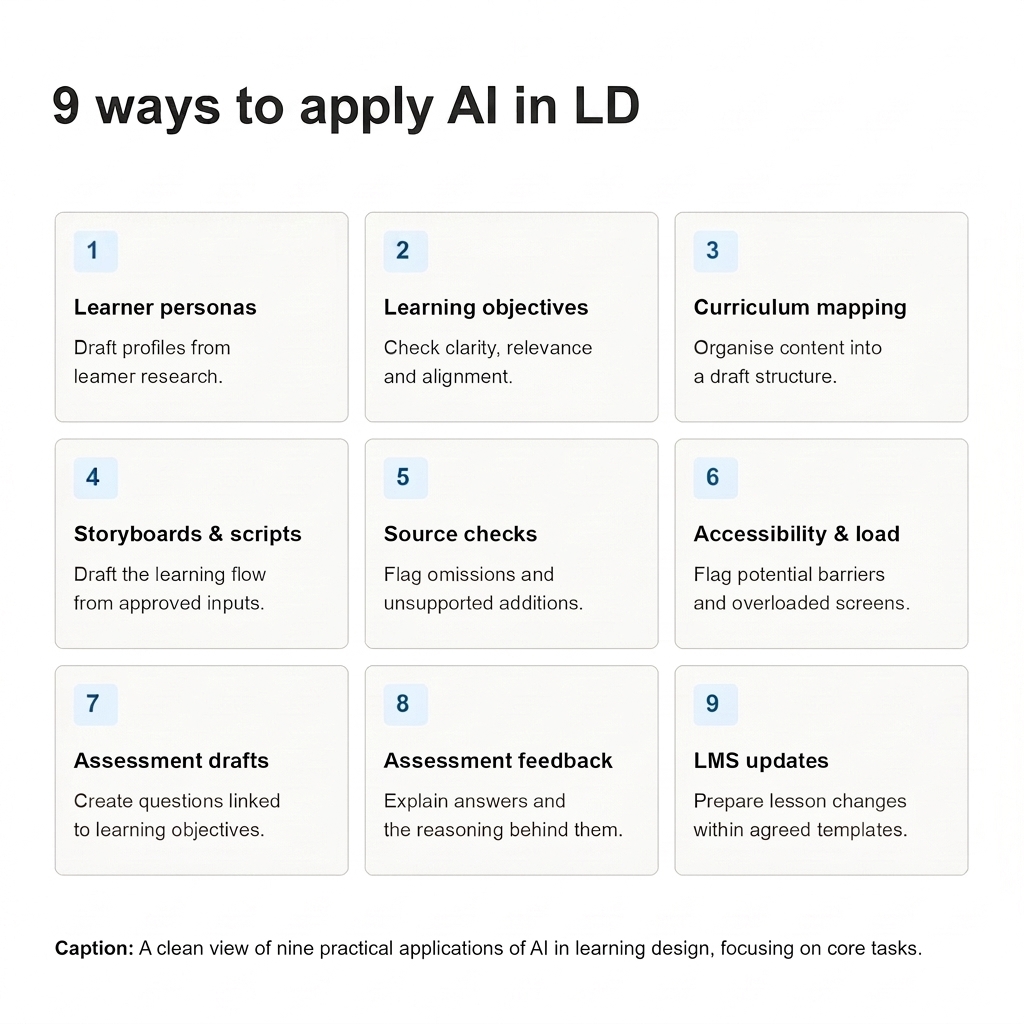
1. Creating learner personas before designing the learning
👥 AI task: Organise learner information into a draft persona and flag gaps or assumptions.
Output: A learner profile with needs, barriers, support requirements and questions to check.
A learner-persona skill gives me a structured way to work with client-provided profiles and project background. Rather than asking for a generic description of the audience, I use it to organise what we know, identify what we are assuming and surface questions that still need answers.
The working artefact is a learner profile covering areas such as:
- What learners need to do and what they already know
- Their working context and the barriers they may face
- The support they may need to take part and apply the learning
- Assumptions and gaps to check with the client or through learner research
I customise the profile structure for the project. A programme for experienced staff needs different questions from an introductory course for people new to a role.
The draft gives us something to discuss before the design goes too far. Once reviewed, it also becomes an input to other skills: checking objectives, choosing activities and reviewing the language used in a storyboard. It is not evidence about learners simply because it is neatly presented.
My article What is a Learner Persona and Why Should You Use It When Creating Online Courses and Training? includes a profile structure, an editable template and an AI-powered helper for working with learner research. Those kinds of reusable artefacts give the task a clearer starting point than a blank chat.
2. Reviewing learning objectives with the learner in mind
🎯 AI task: Draft or refine objectives against learner needs, course goals and approved content.
Output: An objectives table with proposed wording, practice and assessment links, and unresolved questions.
For objectives, I use a skill that works with the learner context, broader goals and approved content. The task is not just to replace “understand” with a more measurable verb. It is to examine what learners should be able to do and whether the proposed learning will support that.
A useful output is a working table showing:
- The draft objective and any proposed revision
- The action learners should demonstrate
- The relevant conditions or criteria, where these have been agreed
- A possible practice activity and assessment approach
- Questions or mismatches that need a design decision
I customise the instructions so missing criteria are marked as questions, not invented. I also check whether an objective fits the learner’s starting point and whether the course can realistically deliver it.
The reviewed objectives then feed into curriculum mapping, storyboarding and assessment design. Linking those tasks makes it easier to notice when the objective asks learners to apply a skill but the proposed course only explains it.
In From Learning Goals to Outcomes: Effectively Communicating the Benefits of Your Training, I use gardening, carpentry and yoga examples to distinguish goals, practice and demonstrable outcomes. Those distinctions are more useful to this review than a list of action verbs alone.
3. Mapping content and building a draft curriculum structure
🗺️ AI task: Sort source material, suggest a learning sequence and map content to objectives.
Output: A content-triage table and draft curriculum map showing lessons, activities, checks, gaps and overlaps.
This is often a combination of skills rather than one task. First, I need to make sense of the source material. Then I need to decide how it should become a learning sequence.
A content-triage step helps separate what learners need to practise, what they need to know and what might work better as reference material. A curriculum-mapping step connects the retained content with objectives, activities and assessment.
The working artefacts might include:
- A content table separating core material, reference material and possible cuts
- A map of modules or lessons against objectives
- Suggested activities, checks and delivery formats
- A proposed sequence, with gaps and overlaps marked for review
I adapt those outputs to the project rather than accepting a standard course outline. A suggested cut may remove something the SME considers necessary; an apparently logical sequence may not reflect how learners carry out the task at work. Those are decisions to discuss, not changes to make automatically.
Once reviewed, the map becomes the foundation for more detailed development. I describe that design work in Stage 2: Course Design: Moving from Research to Action: turning the roadmap into sections, lessons and individual elements to produce.
4. Developing storyboards and scripts from a strong foundation
📝 AI task: Turn the agreed design and source content into a draft using the project’s storyboard template.
Output: A screen-by-screen storyboard with text, narration, visual notes, interactions and objective links.
By the time I use a storyboarding skill, I want the learner context, objectives, relevant content and curriculum map to be available as inputs. Otherwise, it is too easy to get a polished script that has little connection to the design.
I customise the skill around the storyboard template and production requirements. Depending on the project, the output may need screen-by-screen fields for:
- On-screen text and narration
- Visuals and media notes
- Activities, interactions and feedback
- Accessibility notes
- The objective or purpose each screen serves
Sometimes I combine storyboarding with a scenario-development skill, so the first draft includes decisions learners need to make rather than only explanations to read. The approved source content still sets the boundaries.
The value is not simply producing more text. It is getting a draft in a format I can review with the SME, client or developer. I check the sequence, explanations, practice and tone, then revise anything that does not serve the learning goals.
My Storyboarding Tools for eLearning Projects article explains why a simple, shared template can be enough to visualise the flow and discuss it before production. AI-assisted drafting still needs that reviewable structure.
5. Checking the storyboard against source material
🔎 AI task: Compare the storyboard with approved sources and flag possible omissions or changes in meaning.
Output: A comparison log linking flagged passages to source material, with questions for designer or SME review.
Drafting and checking are separate tasks in my workflow. Before a storyboard goes for approval, I use a source-comparison skill to compare it with the SME content or other approved materials.
I want a review artefact, not a blanket statement that the storyboard is accurate. A useful comparison identifies:
- The storyboard passage that needs attention
- The corresponding source passage, where available
- A possible omission, changed meaning, unsupported addition or contradiction
- The question that needs resolving
I customise the checks to the material. Exact terminology may matter in one course; preserving the steps and exceptions in a procedure may be the priority in another.
A flag is a place to look, not a verdict. I check the passages myself and ask the SME where the meaning or source is unclear. Asking another AI task to review a draft does not turn it into an independent expert check.
The resulting issue list gives the review a clearer focus: what needs changing, what needs clarification and what can move forward.
6. Reviewing accessibility and cognitive load
♿ AI task: Flag potential accessibility issues, unclear instructions and competing demands on learners’ attention.
Output: A review checklist with locations, suggested changes and follow-up tests — not an accessibility certification.
I use review skills and checklists to look for potential accessibility issues and places where the material asks too much of learners at once. These checks can sit alongside source comparison, but they need different instructions.
For accessibility, the review may flag missing alternative text, captions or transcripts, unclear instructions and places where meaning depends only on a visual cue. For cognitive load, I look at screens or sections where text, narration, visuals and interactions may be competing for attention.
A useful output is a list of locations, possible issues, suggested changes and checks that still need to happen in the developed course. That helps me distinguish an unclear instruction I can rewrite now from an interaction that needs keyboard or screen-reader testing later.
I adapt the checklist to the format and stage of production. Reviewing a text storyboard is not the same as testing a published module. The output guides the review; it does not establish accessibility compliance. I decide which changes make sense and involve a specialist where needed.
For a wider checklist, 18 Aspects of Accessibility in Online Courses: Create Inclusive eLearning covers areas such as keyboard access, screen-reader compatibility, readable language and accessible assessments.
7. Creating and reviewing assessments aligned with objectives
📋 AI task: Draft questions or activities from approved content and check their alignment with objectives.
Output: An assessment draft with objective links, answers or performance criteria, rationales and points to review.
For assessment design, I bring together the reviewed objectives, approved content and relevant learner context. I use skills for drafting questions or activities, then review the proposed assessment against what learners need to demonstrate.
The draft artefact can include:
- The objective each question or activity addresses
- The question, scenario or task
- Answer options or expected performance
- The rationale for the answer and distractors
- Source references and points requiring review
Where suitable, I ask for scenarios and plausible mistakes rather than factual recall questions alone. If an objective asks learners to apply a procedure, naming its steps is not necessarily enough to demonstrate it.
I customise the format, difficulty and review criteria to the course. A separate review step checks accuracy, ambiguity, coverage and alignment. A clearly formatted question is still a draft until it has been checked and approved by the responsible designer or assessor.
8. Drafting detailed, immediate feedback for assessments
💬 AI task: Draft feedback explaining the reasoning behind each answer and what learners can reconsider.
Output: An answer-by-answer feedback table for review before it is added to the course.
Assessment feedback is another task with its own instructions. I do not want the same generic “Correct!” or “Try again” attached to every answer.
Using the reviewed question, answer rationale and source content, I ask a feedback-drafting skill to explain why each choice is correct or incorrect. The working output may be a table containing:
- The answer option
- The reasoning behind it
- The mistake or misunderstanding an incorrect choice represents
- Feedback that helps the learner reconsider their decision
I customise the length, tone and level of explanation to the audience and delivery format. A short knowledge check and a branching scenario will not need identical feedback.
I then review each explanation against the question and approved content. Does it explain the reasoning? Is it accurate? Does it introduce something learners have not been taught? Does it help them decide what to do differently?
This is feedback prepared and reviewed before it enters the course, not an unchecked AI response delivered directly to a learner. It can be part of a larger assessment workflow, but it still needs its own review.
9. Updating lessons and assignments within a defined LMS structure
🔄 AI task: Prepare requested content changes within agreed lesson and assignment templates.
Output: A draft update showing revised content, what stays unchanged and related checks needed before publishing.
For existing LMS programmes, I use AI agents and reusable instructions designed around agreed lesson and assignment formats. The task is a controlled update, not an invitation to redesign the programme.
I provide the requested changes and the relevant structure or template. A useful draft update shows what is changing, what should stay as it is and where the change affects instructions, activities or assessment.
This is another place where skills can be combined: preparing the revised content, checking it against the approved source and reviewing its fit with the lesson structure. The resulting artefacts give me something to check before any platform update is approved.
Preparing content and changing the LMS are separate capabilities. A skill does not, by itself, provide a connector or permission to publish. Updating lessons or assignments may require the platform’s API and suitable permissions; LTI supports connecting external learning tools rather than automatically providing that editing capability.
Review and approval remain part of the workflow. An update still needs to pass content, navigation and functional checks before it goes live, and fit the client’s agreements and data-protection requirements.
I describe the wider handoffs in AI in Learning Design and Development: My 6 Stage Process. Content preparation and course assembly can remain separate tasks, even when AI supports both.
Choosing and customising the skills for the project
I do not expect one tool or one skill to handle the whole process. My projects in Claude and Perplexity give the work a course- or programme-specific focus, while the skills and reusable instructions guide individual tasks.
Getting a skill ready-made can save some setup work, but I still need to adapt it. When I create one myself, I make the same decisions:
- What information does this task need?
- Which source material should it work from?
- What should it produce, and in which template?
- What should it flag rather than guess?
- What must I review before using the result?
I often combine skills into workflows, but that does not mean running every step without stopping. A learner profile may need checking before it informs objectives. A curriculum map may need agreement before it becomes the basis for a storyboard. A source-comparison report may send the draft back for revision.
The connection between the tasks matters as much as the individual skills. So does keeping the inputs current: an approved revision needs to replace an earlier working draft in the next task.
Tool choice also depends on the client environment, the information I am permitted to share and whether I need conversational work, research support or a structured automation. I use Microsoft Copilot when it fits a client’s Microsoft environment, Claude and GPT-based assistants for conversational work, Perplexity for research support and n8n for structured automations. For learning-design and production tasks, I also use Courseu and Mindsmith for AI-assisted authoring, and Synthesia for video. These tools support different parts of the work; I choose them around the task rather than expecting one platform to do everything.
In How to Choose the Right AI-Powered Course Creation Workflow for Your Team, I distinguish between curriculum drafting, content authoring and LMS assembly. That distinction still applies when skills are involved: a good drafting workflow is not automatically a publishing workflow.
What connects these nine areas
The useful part of this approach is not having a collection of clever prompts. It is having a repeatable way to work on a real learning project, with clear inputs, reviewable outputs and decisions between stages.
I can reuse the method without treating every course as the same. The skills give me a starting structure; customisation makes them relevant to the audience, content and production requirements.
Sometimes I rewrite the output. Sometimes I reject a suggestion or go back to the client for information the project does not yet contain. That is part of the work, not a sign that the workflow has failed.
Rather than asking, “How can AI create this course?”, I find this question more useful: “Which part of this project would benefit from a repeatable AI-supported task, and what would I need to check before taking its output further?”
For more reflections and examples, visit AI in Learning Design.
Which learning-design task have you turned into a reusable skill or workflow — and what have you had to customise to make it useful?
References and further reading
- Guidelines on the Use of Generative AI for Teaching and Learning
- A framework for the Responsible and Effective use
- Guidance for generative AI in education and research
- The intersection of artificial intelligence and instructional design practice: a systematic review
- Faculty Case Studies: Analyzing and Segmenting Content
- Faculty Case Studies: Creating Interactive Materials
- Generative AI in Learning Design Practice
- What is a Learner Persona and Why Should You Use It When Creating Online Courses and Training?
- From Learning Goals to Outcomes: Effectively Communicating the Benefits of Your Training
- Boosting Course Sales: Using Learning Goals and Outcomes as Marketing Tools
- Course Design: Moving from Research to Action
- Storyboarding Tools for eLearning Projects
- 18 Aspects of Accessibility in Online Courses: Create Inclusive eLearning
- AI in Learning Design and Development: My 6 Stage Process
- How to Choose the Right AI-Powered Course Creation Workflow for Your Team