Updated 26 November 2026. First published 26 November 2026.
Picture a new team leader getting ready for their first difficult conversation. A colleague’s work has slipped for weeks and it has to be raised. They’ve completed the eLearning module, watched a video of a calm manager handling it well and picked the best answer in a branching scenario. None of that let them say the words out loud, hear a defensive reply and try again. AI role-play simulations promise to fill that gap: a character that talks back by text, voice or avatar, with feedback at the point of practice.
I’m cautiously optimistic about them. I’ve tested Sana’s scenario voice calls, and I’ve built my own role-play prototypes using ElevenLabs voices inside apps made with Lovable and Claude artifacts. The ones that worked best were interview simulations: an interview panel prep app, and a sales onboarding role-play that drew on the client database and onboarding sheets. The capability is moving fast. But the promise that sells most of these tools, “instant feedback”, isn’t the thing to judge them on. The more useful question is whether the feedback is accurate, useful, fair and accessible.
Free: AI role-play evaluation checklist
Five questions for any AI coach’s feedback, the checks before you choose a tool, and a simple pilot plan, in one Google Doc you can copy.
What AI role-play simulations are (and what they’re not)
An AI role-play simulation gives the learner a scenario, a goal and a character to talk to. A large language model plays the character from a persona description (a manager under pressure, an unhappy customer, a nervous patient) and responds to whatever the learner says, rather than to a fixed set of choices. At the end, or sometimes along the way, the learner gets feedback against criteria the designer set.
That’s a different thing from the videos and branching scenarios most of us build. In my post on video-based learning experiences I described a range that runs from explainer videos to AI coaches. This post sits at the far end of that range, where the learner is no longer watching but rehearsing.
Three modes: text, voice-to-voice and avatar
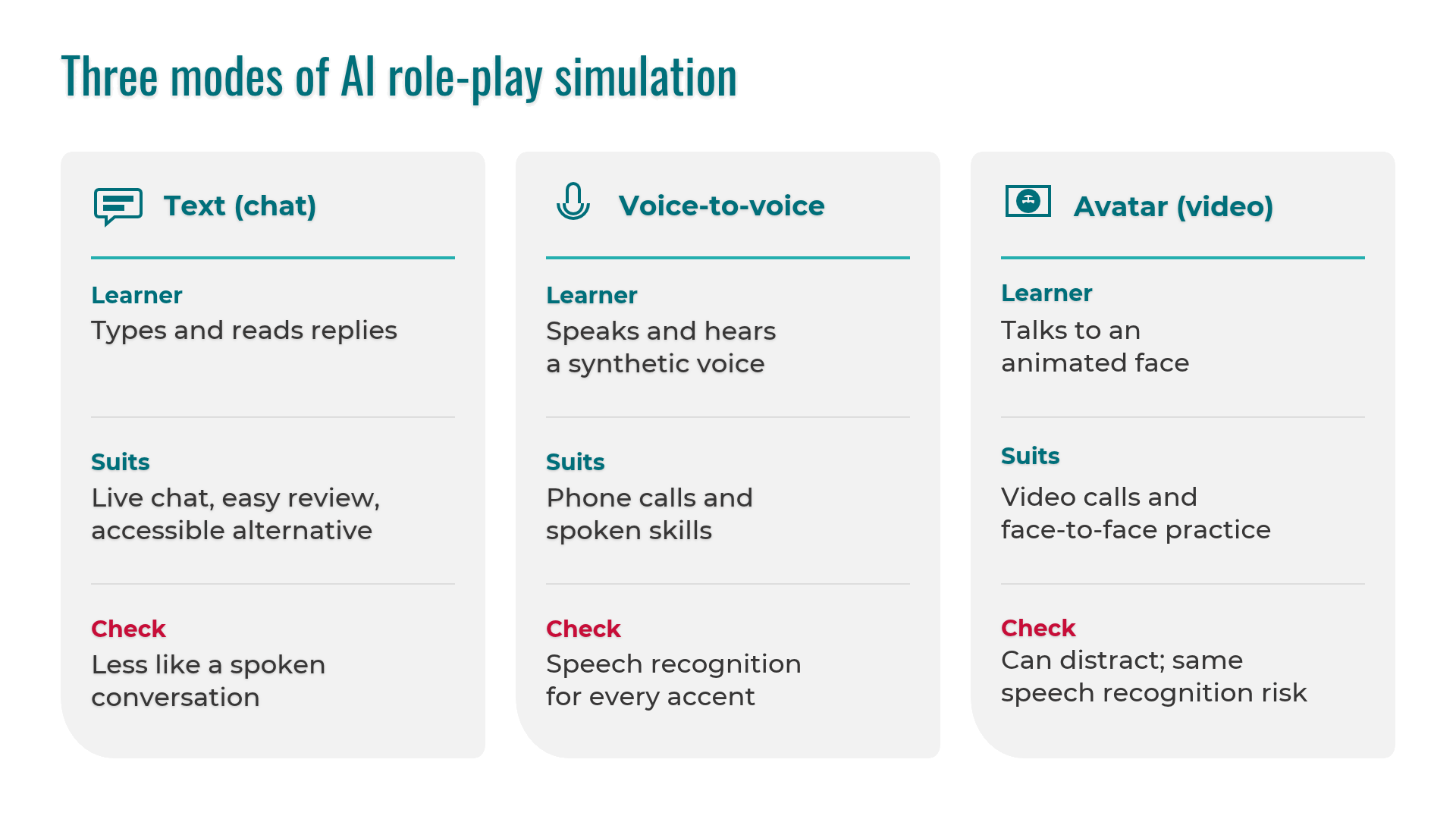
Most tools now offer some mix of three modes:
- Text (chat). The learner types and the character types back. It has the lowest technical barrier, it’s the easiest to review, and it’s a useful accessible alternative.
- Voice-to-voice. The learner speaks, speech recognition turns that into text, the model replies, and a synthetic voice reads the reply aloud. This feels closest to a phone call.
- Avatar (video). A voice conversation with an animated face on screen, closer to a video call.
Docebo’s AI roleplay, for example, offers all three: video with an animated avatar, voice with a static avatar, and chat (Docebo help: Using AI roleplay in Creator). A good rule of thumb is to let the real situation pick the mode. If the real conversation happens on the phone, voice is the honest rehearsal. If it happens in a live chat window, text is.
A few tools, briefly
I’m keeping this list short on purpose. Each tool illustrates a design choice rather than a recommendation.
- Sana Learn scenario cards run chat or real-time voice role-play, with the voice powered by ElevenLabs. The learner gets a summary and suggestions once the conversation reaches its end (Sana help: Scenario card).
- Docebo AI roleplay grades conversations against rubrics in AI-generated reports, with optional human reviewers. Scenario configuration is English only, and voice and video sessions have a 5 to 20 minute limit (Docebo help).
- Synthesia Roleplay Sessions, launched in July 2026, ask learners to reflect on how they did before they see a score, then give an overall score and a skill-by-skill breakdown (Synthesia: Introducing Roleplay Sessions).
- ELB Learning Rehearsal added AI Roleplay with an avatar, a synthetic voice and an automated performance summary that recognises when a goal was only partly met (ELB Learning: Introducing AI Roleplay).
- Attensi RealTalk 3.0 (October 2026) lets you build a scenario by describing it in chat, and assesses conversations with “clusters of tailored evaluators” (Training Industry).
If you’d rather build than buy, the ElevenLabs agents platform is one way to add a voice layer to your own app. I’ve written about other voice uses in Using ElevenLabs in Learning Design and about building small learning apps in Lovable for Learning Design.
“Instant” isn’t the point: what makes AI feedback useful
“Instant” is the word on most product pages. Speed does help a little, because feedback close to the attempt is easier to act on. But fast feedback that’s wrong, vague or unfair is worse than none, because the learner trusts it.
A good starting point is Hattie and Timperley’s review of feedback research. It frames useful feedback around three questions: Where am I going? How am I going? Where to next? (Hattie and Timperley, 2007). They also found that feedback aimed at the person (“well done, you’re a natural”) does the least for learning, while feedback about the task, the process and the learner’s self-regulation does more. It’s an older review, but a foundational one, and it gives you a test that works for any tool.
Five questions to ask of any AI coach’s feedback
When I read a feedback report from an AI role-play, these are the questions I’d suggest asking:
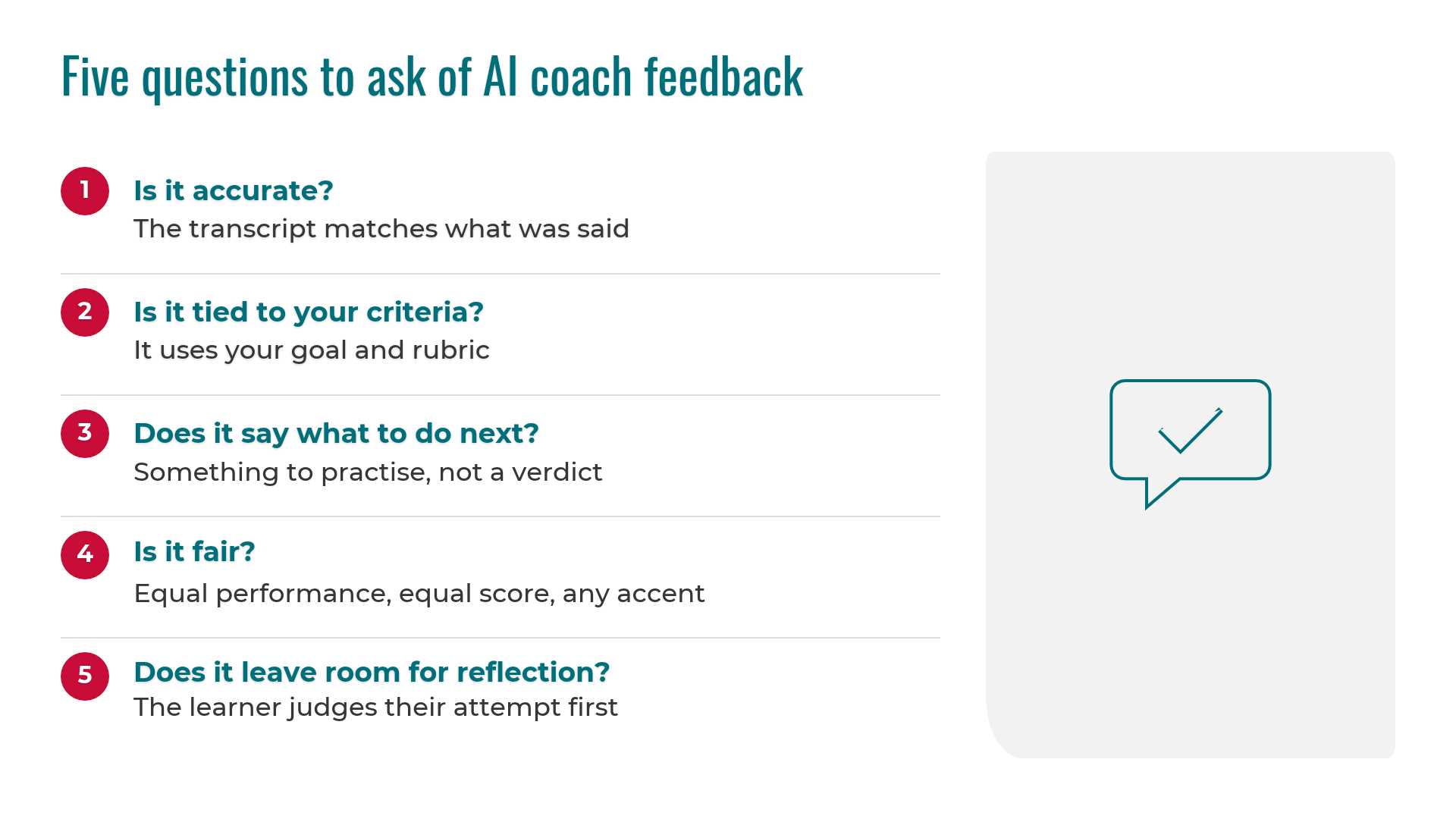
- Is it accurate? Did the tool understand what the learner actually said, and does the transcript match the recording?
- Is it tied to your criteria? Does it refer to the goal and rubric you set, or drift into generic communication advice?
- Does it say what to do next? “Show more empathy” is a verdict. “You moved to the solution before asking how the delay affected them; try one open question first” is something to practise.
- Is it fair? Would two learners who handled the conversation equally well get the same score, whatever their accent, speech pattern or first language?
- Does it leave room for reflection? Does the learner get to judge their own attempt before the tool does?
Synthesia’s reflect-first design is a nice detail here. The learner judges their own performance before seeing the AI’s verdict, which builds the self-assessment habit that Hattie and Timperley place at the most useful level. Sana’s end-of-conversation summary is an honest example of what “instant” often means in practice. The feedback comes after the conversation, not turn by turn, and for many skills that’s the right choice: stopping a difficult conversation every few lines to coach would break it.
This is also where AI role-play links back to ordinary assessment design. Most of these activities are formative, practice with feedback rather than a pass or fail gate. If you’re unsure where yours sits, my post on formative and summative assessment covers the difference.
Where voice and avatars help, and where they get in the way
Voice-to-voice practice has a real advantage for skills that are spoken in real life. Saying “I need to raise something about the last three reports” out loud is different from typing it, and learners can rehearse pace and phrasing. Avatars add a face, which some learners find more realistic and others find distracting.
The catch is that every voice and avatar layer sits on top of speech recognition. The feedback can only be as good as the transcript it’s built on.
Speech recognition isn’t equally accurate for everyone
A widely cited study of five major speech recognition systems found an average word error rate of 0.35 for Black speakers, against 0.19 for white speakers (Koenecke et al., 2020, PNAS). The systems have improved since 2020, but the principle stands: if the transcript is wrong for some learners, the score built on it will be wrong for them too.
More recent work found speech recognition consistently less accurate for disfluent speech, such as stuttering, across all six systems tested (Mujtaba et al., 2024). For a tool that scores “confidence” or “fluency”, that’s a fairness problem as well as a technical one.
Design choices that reduce the risk
- Offer a text mode alongside voice, so learners can choose how to take part.
- Don’t score fluency or pace unless it’s a genuine learning objective, and tell learners when it is.
- Ask the vendor which languages and accents they’ve tested, and test with your own learners’ voices before launch. Docebo’s English-only scenario configuration and Synthesia’s four launch languages (English, German, Spanish and French) are reminders to check this early.
- Check that captions, keyboard access and screen reader support work for the whole activity, not only the video player. My 18 aspects of accessibility in online courses is a handy checklist for this.
What the evidence says so far
The honest answer is: not much yet, and most of it is small. Figures on vendor pages, such as improvement percentages from pilot customers, are vendor claims and are best read that way.
There is some cautiously positive research. In a small double-blind randomised controlled trial, medical students who practised history-taking with ChatGPT-simulated patients and received AI feedback scored higher than students who practised without the feedback (Brügge et al., 2024, BMC Medical Education). There were 21 students and the difference was only just significant, so it’s a promising signal rather than proof.
There are warning signs too. A study comparing LLM-generated replies with human-scripted ones in a 23-turn negotiation simulation found the LLM’s reply quality declined as the conversation went on, while the scripted replies held up. Agreement between an LLM judge and human raters was only moderate (r = 0.66) (Lu, Jeuring and Gatt, preprint). It’s one scenario and not yet peer reviewed, but it matches a practical risk: a persona that starts well can drift by the fifteenth turn, and an AI scorer can be confidently out of step with an expert.
The older research on simulations still applies. Practising in a realistic, low-risk setting is a long-standing idea, and I summarised some of that literature years ago in Engaging workers in simulation-based e-learning. AI changes how open the conversation can be, not why simulation is useful.
Checks before you commit to a tool
Here’s what I’d look at before choosing a tool or building your own.
1 Scenario and persona quality
- Alignment. Does the scenario follow your organisation’s policy or communication model? If your feedback model has four steps, the rubric should use those four steps.
- Stereotypes. Read every persona description and listen to every voice. An “angry customer” who always has a particular accent teaches something you didn’t intend.
- Long conversations. Play each scenario to the end, several times, and try being unhelpful, off-topic and rude. That’s where drift shows up.
- Authoring time. Tools such as Attensi’s RealTalk Maker make scenarios faster to build, which moves the designer’s effort from writing towards checking.
2 Scoring and human oversight
- Who checks the scorer? Compare AI scores and comments with an expert’s judgement on a sample of attempts before you rely on them. Docebo’s optional human reviewers are one model; if a tool doesn’t say, ask.
- Stakes. Keep AI scores out of anything high-stakes, such as certification or performance reviews, until you’ve done that comparison.
3 Knowledge base and off-topic questions
A persona can only be as accurate as what it knows. For anything beyond a generic conversation, give the character a knowledge base: the policy, product details, price list or case notes the real conversation depends on. My sales onboarding role-play worked because it drew on the client database and onboarding sheets, so the “client” asked about things a new starter would actually meet. If you build your own, the ElevenLabs agents platform, for example, lets you attach documents, web pages or text as a knowledge base.
Then plan for the questions nobody should ask. Learners will test the character with jokes, nonsense or questions far outside the scenario, sometimes on purpose. A few things help:
- Write an out-of-scope rule into the persona: stay in character, give a short natural reply and steer back to the scenario.
- Tell the persona not to invent facts that aren’t in its knowledge base. A customer who “remembers” a refund policy you don’t have teaches the wrong thing.
- Decide whether off-topic turns count in the feedback, and tell learners.
- Add a handful of silly and irrelevant questions to your test script, alongside the awkward paths.
4 Data, privacy and the EU AI Act
Voice recordings are personal data, so you’ll want to know where they’re stored, for how long, and whether they’re used to train the vendor’s models. For EU learners there’s a sharper point. The EU AI Act prohibits AI systems that infer emotions in workplaces and education institutions (Article 5(1)(f), applying since 2 February 2025), with narrow medical and safety exceptions (Future of Privacy Forum). Inferring emotions from voice is in scope; analysing written text isn’t.
So if a tool scores “empathy” or “confidence” from the learner’s tone of voice, ask the vendor how it works before using it with EU learners. This isn’t legal advice, and my 2026 review of AI and legal issues for course creators covers the wider picture.
5 Cost
Check whether pricing is per seat, per session or per minute of voice, and get a quote before you get attached to a demo. Voice and avatar modes can cost more to run than chat, so compare like with like.
How to start small with AI role-play simulations
A small pilot tells you more than any demo. This is the sequence I’d suggest:
- Pick one conversation that matters and is hard to practise now: giving corrective feedback, handling a refund complaint, a first sales call.
- Write the rubric first. Three to five observable behaviours, in your organisation’s own language.
- Build or configure one scenario, with the knowledge base it needs, and test it yourself to the end, including the awkward paths and a few off-topic questions.
- Run it with a small group of five to ten learners, with a text option available.
- Compare the AI feedback with an expert’s on the same attempts. Where do they disagree, and who is right?
- Ask learners whether the feedback told them what to do next, and whether they’d use it again before a real conversation.
- Decide whether to scale, adjust or stop. Stopping is a valid result.
Treat the activity as one step in a blended design rather than the whole thing: a rehearsal space before a coached session or a real conversation, not a replacement for either.
FAQ
Can AI role-play replace live coaching?
No. It gives learners more repetitions and a low-risk place to try things, but a skilled coach notices context, relationships and nuance that a scenario can’t. It works best before and between coaching sessions.
Does voice interaction improve learning in AI role-play?
It can make practice more realistic for spoken skills, but there’s little evidence yet that voice on its own improves results. Scenario design and feedback quality matter more, and voice adds accuracy and accessibility risks.
How reliable is AI-generated feedback?
It varies by tool and by skill. It tends to be more dependable on concrete behaviours (did the learner ask an open question?) than on subjective ones (was the tone warm?). Check it against expert judgement before you rely on it.
Are AI role-play tools accessible?
Accessibility is often not documented. Look for a text alternative to voice, captions, keyboard access and screen reader support, and test with real learners.
Can I build my own instead of buying a platform?
Yes, if you’re comfortable with app builders and voice APIs. You get full control over the persona and the rubric, but you also take on testing, hosting and data protection yourself.
A last thought on practice that talks back
I’m glad to see more tools that let learners rehearse a conversation instead of only watching one. The ones worth using will be those whose feedback stands up when an expert reads it, works for every learner’s voice, and tells people what to try next time. If you’ve piloted AI role-play, what did you compare the feedback against, and did it hold up?
Free: AI role-play evaluation checklist
Weighing up an AI role-play tool? The checks from this post in one place: five questions for any AI coach’s feedback, what to check before you commit to a tool, and a simple pilot plan. Sign up and I’ll email it to you, and keep you posted when I publish new posts.
References
- Brügge, E. et al. (2024). Large language models improve clinical decision making of medical students through patient simulation and structured feedback: a randomized controlled trial. BMC Medical Education.
- Docebo. Using AI roleplay in Creator. Docebo Help Centre.
- ELB Learning. Introducing AI Roleplay.
- ElevenLabs. Agents platform overview.
- ElevenLabs. Knowledge base. Agents platform documentation.
- Future of Privacy Forum (2026). Red lines under the EU AI Act: unpacking the prohibition of emotion recognition in the workplace and education institutions.
- Hattie, J. and Timperley, H. (2007). The Power of Feedback. Review of Educational Research, 77(1).
- Koenecke, A. et al. (2020). Racial disparities in automated speech recognition. PNAS, 117(14).
- Lu, Jeuring and Gatt. Study of LLM-generated and human-scripted replies in a negotiation simulation, arXiv preprint 2509.17694.
- Mujtaba, D. et al. (2024). Lost in Transcription: Identifying and Quantifying the Accuracy Biases of Automatic Speech Recognition Systems Against Disfluent Speech. NAACL 2024.
- Sana. Scenario card. Sana Help Centre.
- Synthesia. Introducing Roleplay Sessions: interactive coaching and practice with avatars.
- Training Industry. Attensi ships RealTalk 3.0.