The usual way to list “types of video in eLearning” is by production format: explainer videos, instructor-led videos, screencasts, demonstrations, interviews, animations, and so on. That is still useful, but it no longer captures what is happening in learning design.
Video sits inside a wider set of visual learning experiences. Some are traditional videos that learners watch. Some are interactive videos they click through. There are also visual practice environments where learners speak, type, role-play, or receive feedback from an AI-supported coach or simulated character.
Not all of these are videos in the traditional “press play and watch” sense. Some are visual, interactive, or AI-supported practice environments. But they sit close enough to video-based learning that course designers need to consider them when choosing the right media format.
That distinction matters. A recorded explainer video and an AI-supported conversation practice tool can both appear inside an eLearning course, but they support different learning goals. One is better for explanation. The other is better for practice, feedback, and confidence-building.
What counts as a video-based learning experience?
In simple terms, video-based learning experiences are any learning activities that use video, visual media, screen recording, avatars, live video, interactive video, or simulation-style visuals to explain, demonstrate, model, practise, or support a skill. In modern eLearning, this can include traditional videos as well as AI-supported role-play, digital coaching, and avatar-based practice.
The key is not whether the experience is technically a video file. The better question is whether the visual format helps learners understand, observe, decide, practise, or receive feedback.
This shift is easier to see as a spectrum: from traditional video through to interactive and AI-supported practice.
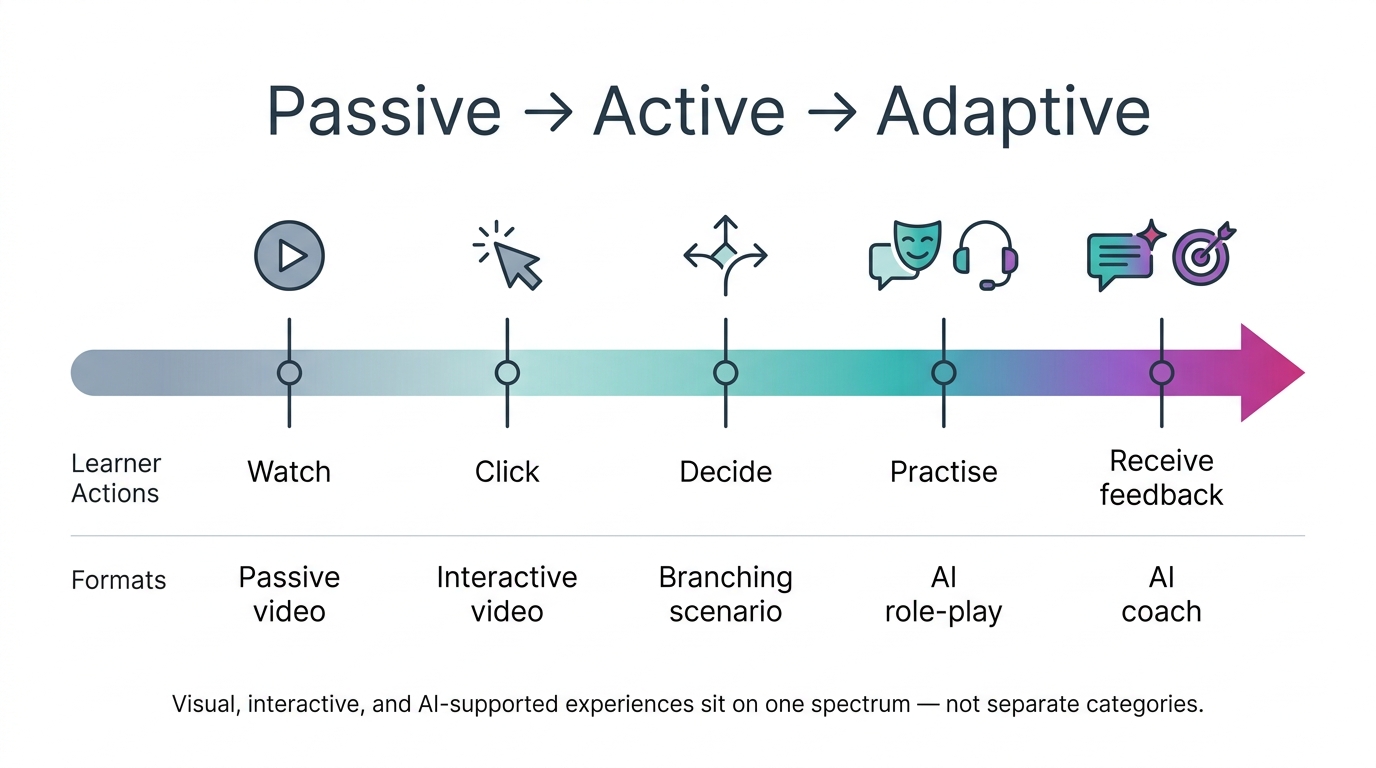
AI-supported role-play and digital coaching are becoming more visible in L&D. For example, ATD has described AI digital coaches that can answer learner questions inside training and AI-powered simulations where the AI takes on a persona such as an interviewer, customer, or employee. Training Industry has also described AI role-play platforms as practice environments for sales and service conversations. These examples suggest that course designers may need to think beyond “video types” and consider the broader category of video-based and visual learning experiences.
A better question: what kind of visual learning experience does the learner need?
Instead of asking only “What type of video should I create?”, ask:
- Does the learner need to understand a concept?
- Watch a process?
- See a skill demonstrated?
- Practise a conversation?
- Make decisions in a scenario?
- Receive feedback?
- Build confidence before doing something in real life?
Those questions lead to better design choices. A short explainer may be enough for a simple concept. A screencast may be better for a software task. A branching video may suit decision-making. A visual practice simulation or AI-supported coach may be useful when the learner needs repeated practice in a safe environment.
If you are planning a course, this kind of decision point is often more useful than starting with a list of tools or formats.
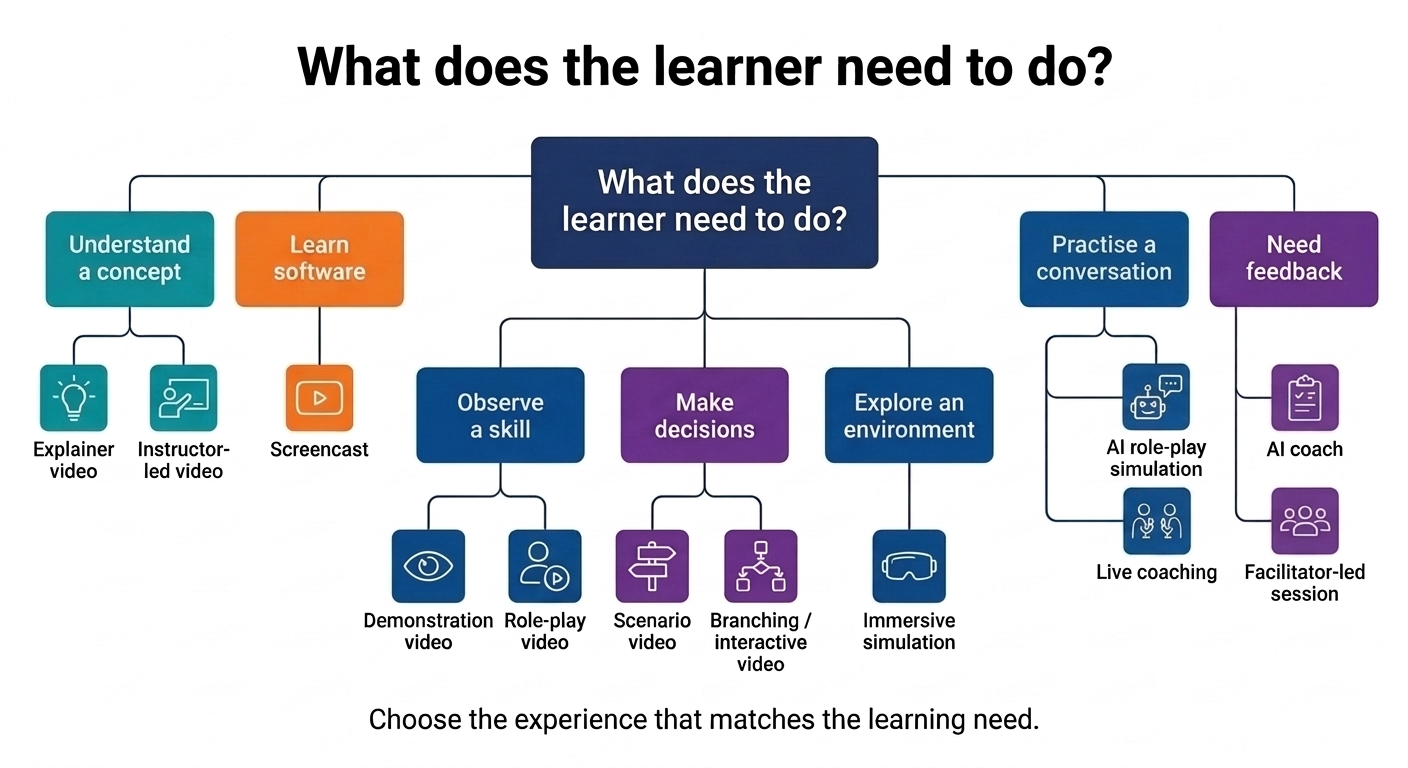
The categories below are not a production menu where every course needs one of each. They are design options. The right choice depends on whether learners need to understand, observe, practise, decide, reflect, or receive feedback.
Whichever format you choose, plan for accessibility from the start. That means thinking about captions, transcripts, keyboard access, screen-reader compatibility, audio alternatives, visual clarity, and learners who may not be able to use voice, video, or fast-paced interaction in the same way.
Traditional video formats
These formats are closest to what most people mean when they talk about video in eLearning. Learners usually watch, listen, observe, and then complete a related activity, reflection, or task.
1. Explainer video
Purpose: To make a concept, process, or idea easier to understand.
Explainer videos work well when learners need a short introduction before moving into an activity, discussion, or task. They often use narration, graphics, text, icons, animation, or simple diagrams.
Use explainer videos for:
- introducing a new topic
- simplifying a complex process
- explaining a model or framework
- preparing learners for a more detailed activity
Example: A two-minute animated explanation of how a supply chain process works before learners analyse a case study.
Design note: Keep the video focused on one core idea. If the topic needs several explanations, use a short video series rather than one long video.
2. Instructor-led video
Purpose: To give learners a direct explanation from a trainer, lecturer, facilitator, or subject matter expert.
Instructor-led videos can feel personal and authoritative, especially when the topic benefits from expert interpretation. They may include a talking head, slides, screen-sharing, diagrams, or a recorded webinar segment.
Use instructor-led videos for:
- expert introductions
- mini-lectures
- course welcomes
- complex topics that need explanation and judgement
- reflective or perspective-based content
Example: A learning designer explaining why accessibility decisions should be made before course production starts.
Design note: Avoid recording long lectures and dropping them into an online course unchanged. Break them into shorter sections and add reflection prompts, checks, or activities between them.
3. Screencast or screen-recording video
Purpose: To show learners how to use software, systems, dashboards, platforms, or digital tools.
Screencasts are useful when the learning outcome involves following a process on screen. They can show navigation, clicks, settings, workflows, and common mistakes.
Use screencasts for:
- software tutorials
- LMS navigation
- system onboarding
- tool demonstrations
- dashboard walkthroughs
Example: A step-by-step walkthrough showing a manager how to approve a request in an HR system.
Design note: Edit out unnecessary waiting time and zoom in on important areas. Add captions or text labels where the screen is busy.
4. Demonstration video
Purpose: To show how something is done.
Demonstration videos are useful when learners need to see a task, procedure, behaviour, or technique before trying it themselves. They may be live-action, screen-based, animated, or a combination.
Use demonstration videos for:
- practical procedures
- product use
- physical tasks
- safety steps
- technical skills
- workplace routines
Example: A healthcare training video showing the correct sequence for preparing equipment.
Design note: A good demonstration video should show the task clearly, but it should also explain why each step matters. If learners only copy steps without understanding the reason, transfer may be weak.
5. Microlearning video
Purpose: To deliver one focused learning point quickly.
Microlearning videos are short, specific, and usually designed for quick use. They work well as part of a larger learning path, refresher sequence, performance support resource, or campaign.
Use microlearning videos for:
- quick tips
- refresher content
- short process reminders
- single-task demonstrations
- pre-work or follow-up
- spaced reinforcement
Example: A 90-second video reminding sales staff how to open a discovery call.
Design note: Short does not automatically mean effective. The video still needs a clear purpose and should connect to a task, decision, or behaviour.
6. Testimonial or case study video
Purpose: To show a real example, experience, or story.
Case study and testimonial videos can add credibility and context. They can show how someone applied a skill, solved a problem, handled a challenge, or experienced a change.
Use testimonial or case study videos for:
- customer stories
- learner stories
- expert interviews
- project examples
- lessons learned
- behaviour modelling through real experience
Example: An employee explains how they used a new process during a real project and what they would do differently next time.
Design note: Make the learning point explicit. A good story is useful, but learners still need to know what to take from it.
Interactive and scenario-based formats
These formats ask learners to do more than watch. They may make decisions, compare examples, respond to scenarios, practise with a facilitator, or explore an environment.
7. Scenario-based video
Purpose: To show a realistic situation and ask learners to think through what they would do.
Scenario-based videos work well for judgement, decision-making, communication, compliance, ethics, and customer situations. They can be linear or interactive.
Use scenario-based videos for:
- decision-making practice
- compliance dilemmas
- customer service situations
- workplace conversations
- safety or risk recognition
- ethical judgement
Example: A short video showing a difficult customer interaction, followed by a question asking the learner what the employee should do next.
Design note: The scenario should include enough context for the learner to make a meaningful decision. Avoid making the “right answer” too obvious unless the purpose is awareness rather than practice.
8. Branching or interactive video
Purpose: To let learners make choices and see different consequences.
Interactive video turns viewing into a more active experience. Learners might click hotspots, answer questions, choose a path, select a response, or explore information in their own order.
Use interactive video for:
- branching scenarios
- compliance decisions
- product exploration
- customer conversations
- safety walkthroughs
- knowledge checks inside video
Example: A learner watches a manager respond to a workplace issue and chooses what the manager should say next. The video changes based on the learner’s choice.
Design note: Interactive video works best when the interaction changes the learning experience. Do not add clicks just to make the video feel interactive.
9. Role-play video
Purpose: To model behaviours, conversations, or interpersonal skills.
Role-play videos use actors, colleagues, or presenters to show examples and non-examples. They can be especially useful for soft skills because learners can observe tone, body language, phrasing, and timing.
Use role-play videos for:
- sales conversations
- feedback conversations
- coaching skills
- conflict resolution
- customer service
- leadership communication
Example: Two versions of the same feedback conversation: one handled poorly, one handled more constructively.
Design note: Role-play videos should not feel like awkward corporate theatre. Keep dialogue realistic and focus on the behaviour you want learners to notice.
10. Assessment or video-based practice task
Purpose: To check understanding, judgement, or skill application using video or visual prompts.
Assessment videos can show a scenario, process, or performance and ask learners to respond. They may include embedded questions, recorded responses, branching choices, or AI-supported feedback.
Use assessment or practice videos for:
- identifying errors
- choosing next steps
- analysing performance
- responding to a scenario
- recording learner practice
- comparing examples and non-examples
Example: A learner watches a short clip of a coaching conversation and identifies which questioning techniques were used well.
Design note: The assessment should match the learning outcome. If the outcome is conversation skill, a multiple-choice question may not be enough. A recorded response, facilitated practice, or AI-supported scenario may be more appropriate.
11. Onboarding video experience
Purpose: To welcome learners and help them understand a course, organisation, role, system, or learning path.
Onboarding videos can combine welcome messages, system walkthroughs, culture stories, checklists, and interactive elements. They can also include AI support, such as a digital guide that answers common questions.
Use onboarding video experiences for:
- new employee induction
- course orientation
- LMS introduction
- programme welcome
- role-specific pathways
- first-week support
Example: A new starter watches a welcome video, explores a short interactive map of the organisation, then asks an AI assistant questions about the learning path.
Design note: Onboarding should reduce uncertainty. Keep it practical and make the next step obvious.
12. Live video and facilitated video sessions
Purpose: To support real-time learning, discussion, coaching, or feedback.
Live video sessions include webinars, virtual classrooms, coaching calls, office hours, and group discussions. They are not self-paced eLearning in the strictest sense, but they often sit inside blended online programmes.
Use live video sessions for:
- discussion
- coaching
- collaborative problem-solving
- live feedback
- Q&A
- practice with a facilitator
Example: A live role-play session where learners practise giving feedback, then receive comments from a facilitator and peers.
Design note: Do not use live video just to deliver a lecture that could have been recorded. Use the live format for interaction, practice, discussion, and feedback.
13. Immersive simulation or virtual environment
Purpose: To let learners practise in a realistic or semi-realistic environment.
Immersive simulations may use 360-degree video, virtual reality, augmented reality, branching environments, or scenario-based interfaces. Some may include AI characters or adaptive feedback.
Use immersive simulations for:
- safety training
- equipment or environment familiarisation
- emergency response
- complex decision-making
- spatial awareness
- high-risk or hard-to-practise situations
Example: A learner explores a 360-degree workplace scene and identifies safety risks before entering the real environment.
Design note: Use immersive formats when the environment matters. If the learner only needs information, a simpler format may be better.
AI-supported visual experiences
These formats are not always “video” in the strict sense, but they often use visual interfaces, avatars, simulated calls, synthetic presenters, or media-rich practice environments. They are useful to consider because more learning platforms are starting to combine video-style presentation, interaction, coaching, and feedback.
14. AI role-play simulation
Purpose: To let learners practise conversations with an AI character, persona, or avatar.
This is where the category expands beyond traditional video. The experience may look like a video call, chat, avatar conversation, or interactive scenario. The learner speaks or types, the system responds, and the interaction may adapt based on the learner’s input.
These are not videos in the usual “press play and watch” sense. They are visual practice experiences that may use avatars, voice, video-style interfaces, or simulated conversation environments.
Use AI role-play simulations for:
- sales conversations
- customer service
- coaching practice
- leadership conversations
- interview practice
- difficult conversations
- objection handling
Example: A learner practises speaking with an upset customer. The AI customer responds based on what the learner says, then the system gives feedback on tone, clarity, empathy, or problem-solving.
Design note: AI-supported role-play works best when the conversation has a clear goal, a realistic persona, and useful feedback criteria. It should not be treated as a novelty. Decide what good performance looks like before adding the interaction. Also test the quality of the feedback. Immediate feedback is only useful if it is accurate, specific, safe for the context, and aligned with the learning goal.
15. AI video coach or digital coach
Purpose: To provide guidance, feedback, or practice support inside the learning experience.
An AI coach may appear as a chatbot, voice assistant, avatar, or video-call-style guide. It might answer questions, help the learner reflect, provide feedback, or prompt practice.
ATD gives the example of a digital coach inside an eLearning module that can answer learner questions based on company policies or training content. This kind of coach can function as a “help” or “ask me anything” feature within a course.
Use AI video coaches or digital coaches for:
- just-in-time support
- guided reflection
- coaching prompts
- practice feedback
- policy or process questions
- personalised follow-up after a scenario
Example: After a leadership scenario, the learner asks the AI coach how to respond if an employee becomes defensive. The coach gives guidance based on the organisation’s feedback model.
Design note: Be careful with boundaries. If the AI coach is answering policy, compliance, medical, legal, or safety questions, the source material, review process, and limitations need to be clear. Learners should know what the coach can and cannot reliably support.
16. AI-generated presenter or avatar video
Purpose: To create or update presenter-style videos quickly using AI avatars, synthetic voices, translation, or localisation.
AI-generated presenter videos can be useful when you need consistent, updateable training content across multiple languages or versions. They can reduce production time, but they also raise questions about authenticity, consent, accessibility, bias, and learner trust.
Use AI-generated presenter videos for:
- standardised explanations
- multilingual training
- policy updates
- onboarding messages
- short procedural content
- content that changes often
Example: A compliance update delivered by an AI avatar, with translated versions for different regions.
Design note: Do not use an AI presenter just because it is faster. Consider whether the topic needs human presence, credibility, emotional nuance, or local context.
Platforms include AI-supported practice
Many LMS, LXP, and video platforms are including in their builds AI-supported conversation practice into the learning environment, rather than treating it only as a separate simulation tool.
For example, Sana Learn has described scenario voice calls where learners can practise conversations such as sales negotiations or peer feedback. Docebo has described AI role-play practice through voice or chat, alongside other AI video and presenter features. Synthesia has also introduced Roleplay Sessions, which connect avatar-based practice with AI-powered coaching.
These examples are useful because they show where the market is moving: towards learning experiences that combine visual presentation, avatar interaction, voice or chat, practice, feedback, and platform data. However, vendor descriptions change quickly, so check current product pages before quoting specific features, availability, beta status, or roadmap claims.
Choosing the right video-based learning experience
The best format depends on what the learner needs to do after the course.
| Learning need | Better-fit experience |
|---|---|
| Understand a concept | Explainer video, instructor-led video |
| Learn a software task | Screencast, demonstration video |
| See how a behaviour looks | Role-play video, demonstration video |
| Make decisions | Scenario-based video, branching video |
| Practise a conversation | AI role-play simulation, live coaching, role-play video |
| Get feedback | AI coach, facilitator-led video session, video-based practice task |
| Refresh knowledge | Microlearning video |
| Explore an environment | 360-degree video, immersive simulation |
| Standardise messages across regions | AI-generated presenter or avatar video |
A good eLearning course may use several of these formats, but each one should have a clear reason for being there.
Final note
Video in eLearning is no longer just about recorded content. It now includes a wider range of video-based, visual, interactive, and AI-supported learning experiences.
That does not mean every course needs AI-supported role-play, an avatar coach, or an interactive simulation. These formats are useful when they support the learning goal: practice, decision-making, feedback, confidence-building, or transfer to real work.
A simple explainer video may still be the right choice. A screencast may be enough. But when the learning goal involves conversation, judgement, or repeated practice, AI-supported coaching and simulation experiences are now worth considering alongside traditional video formats.
The best choice is not the most advanced format. It is the format that helps learners do what they need to do next: understand, observe, decide, practise, receive feedback, or perform with more confidence.
References
- ATD: AI-Powered Interactivity Delivers a New Level of E-Learning
- Training Industry: Why AI Role-Play Is the Future of Sales and Service Training
- Training Industry: AI Role-Play Training: Empowering Virtual Humans at Work
- Training Industry: Harnessing Simulations and AI for Coaching
- eLearning Industry: ELB Learning Launches AI Roleplay
- eLearning Industry: Synthesia Launches Roleplay Sessions
- Sana Learn: The future of enterprise learning
- Sana Learn Summer 2026: Scenario voice calls
- Docebo Roleplay: AI-Powered Practice & Skills Training Platform
- Docebo Help: Overview of artificial intelligence functionality and models in Docebo